GlossGenius Creators: product walkthrough

How the app maps to your team's work

Screens show demo data.

25 screens across 7 areas · mapped to the 8 jobs your team described (~363 hours per quarter)

Every screen includes a team decision row: Keep / Improve / Remove / Add to roadmap

01 / 46Terminal AI
/ how to use

How to use this walkthrough

Start here

  1. 01Follow a campaign from setup and creator sourcing through outreach, contracts, review, posting and reporting.
  2. 02Each screen pairs a product image with the job it supports, what is working, what is missing and a question for your team.
  3. 03Status labels show whether a feature is ready, in progress, or still to come.
  4. 04Feedback labels show what is done, partly complete or still open.
  5. 05The closing slides cover your feedback, open questions, ready-to-switch-on features, current gaps, next priorities and a suggested discussion.

Status labels

Ready

Available for your team

Built, not
switched on

Built, but not available to your team yet

In progress

Part of the job is covered

Not built yet

Not available in the app yet

what you're seeing

Screens show demo data.

02 / 46Terminal AI
/ job map

The job map

363hr / quarter
Ready100h
In progress193h
Built, not
switched on
40h
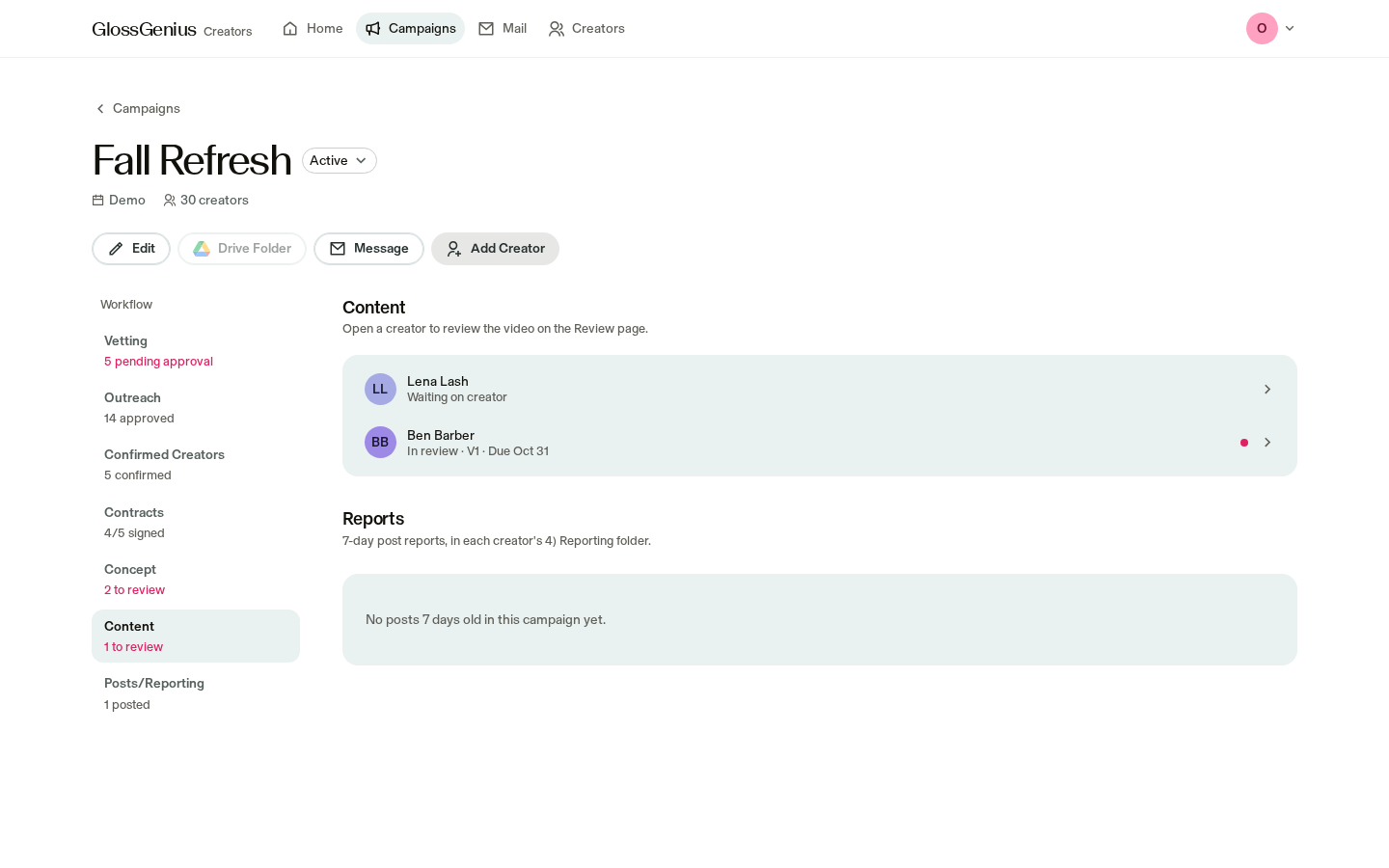
Not built yet30h

Brief ideation & approvals

20h
Not built yet~2-3 weeks
where in the app

No screen yet. Briefs live in Google Docs and Slides.

today

Campaign setup stores the name, dates, budget and number of creators.

needed

A place to add the brief to each campaign, then help with a first draft.

Sourcing

50h
In progressAlways on, ~8 weeks heavy
where in the app

Creators list · Campaign vetting

today

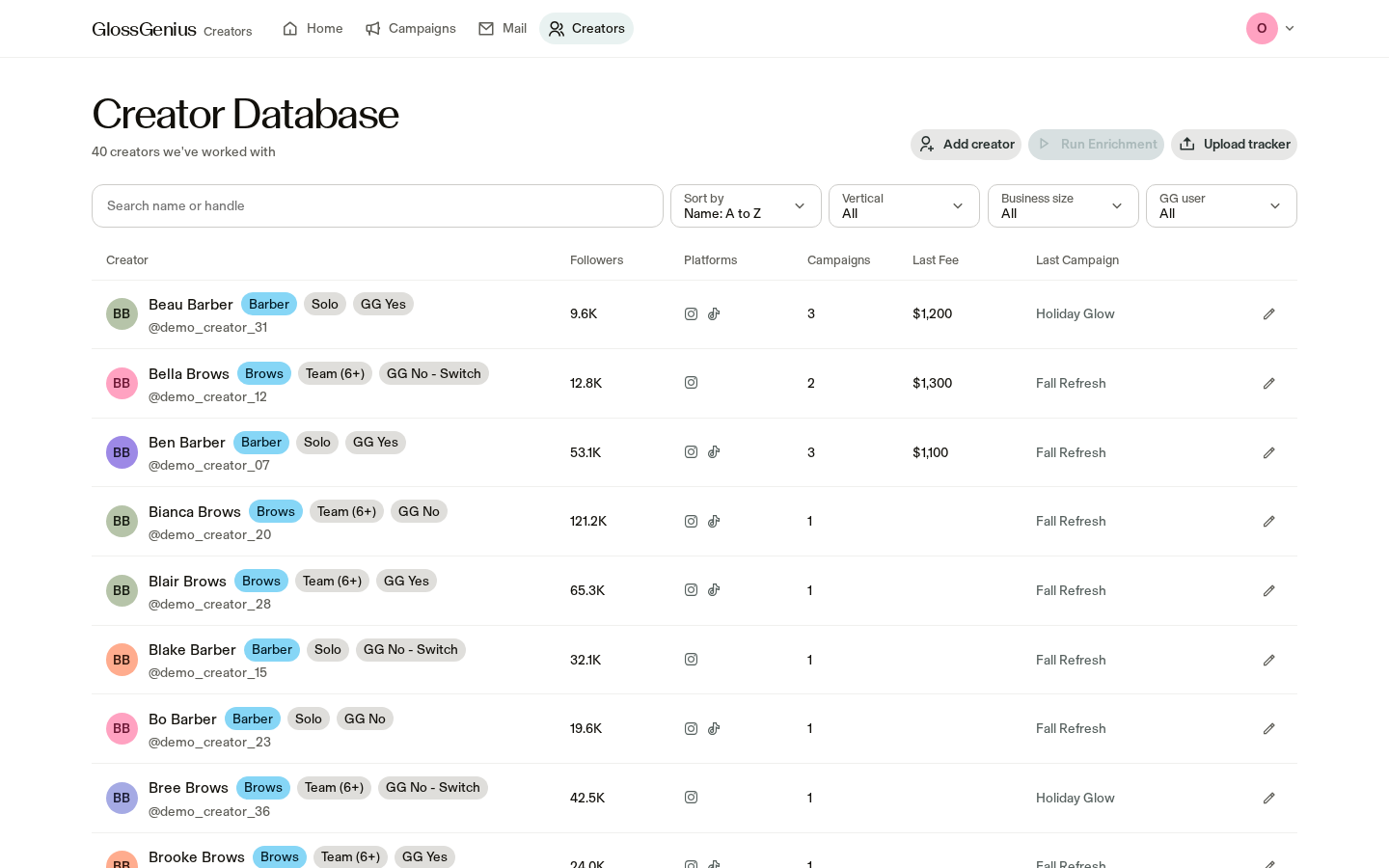
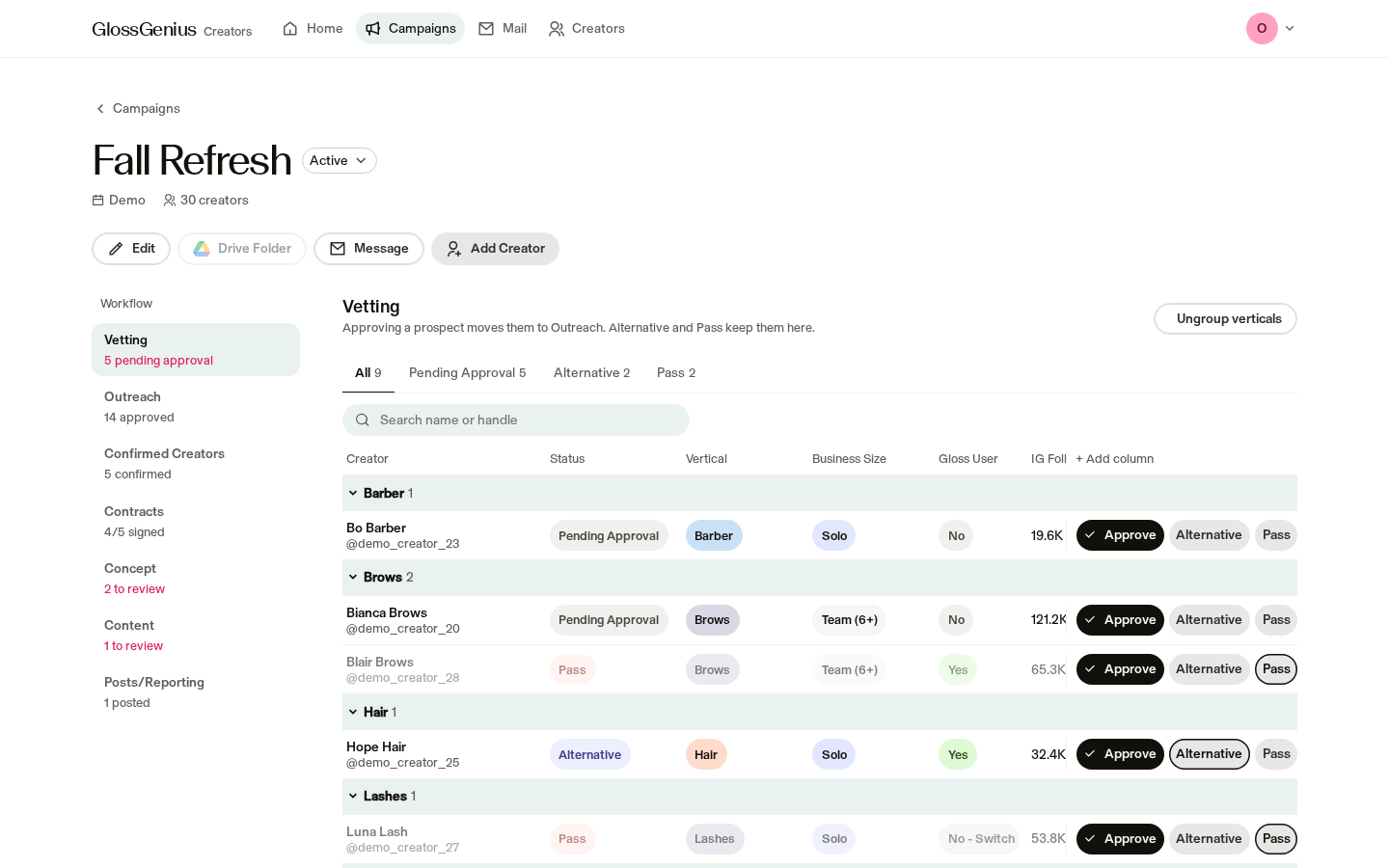
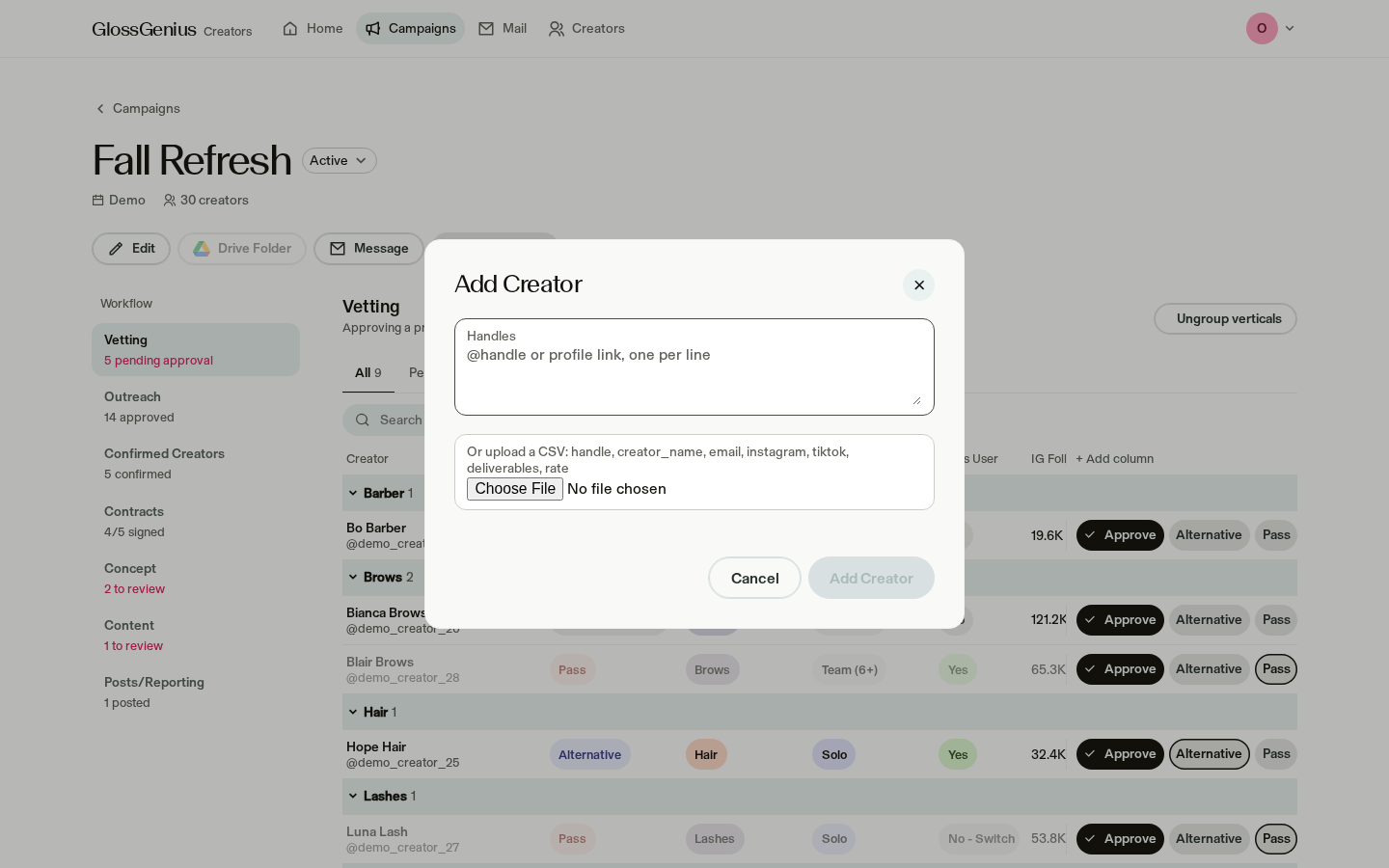
Add and edit creators, filter GlossGenius users, and move creators through Pending approval, Approved, Alternative or Pass. Spreadsheet upload is available.

needed

Your team plans to keep using Archie for now; decide whether to switch on automatic creator details.

Outreach

65h
In progressFull quarter, ~8-10 weeks heavy
where in the app

Campaign outreach · Mail

today

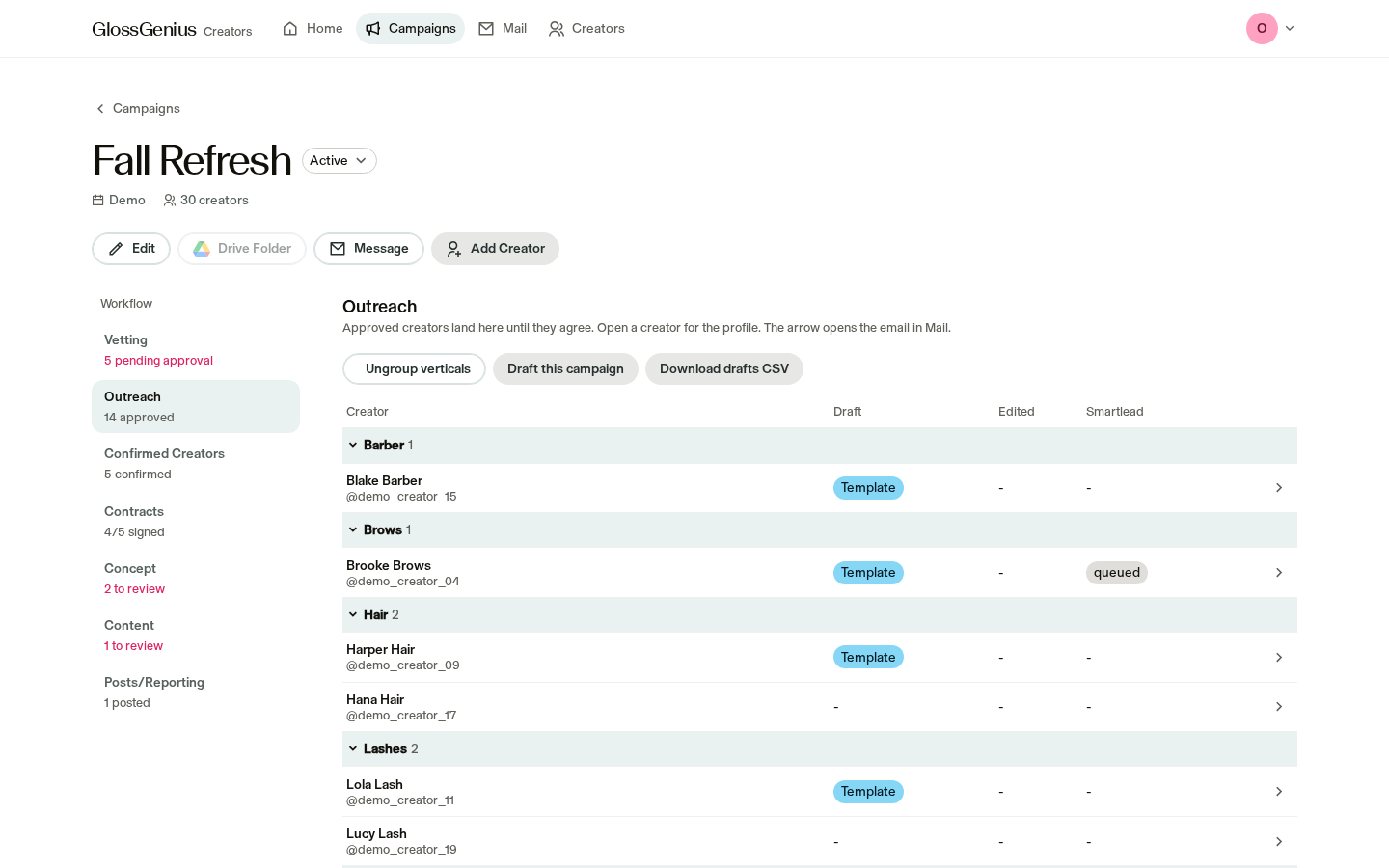
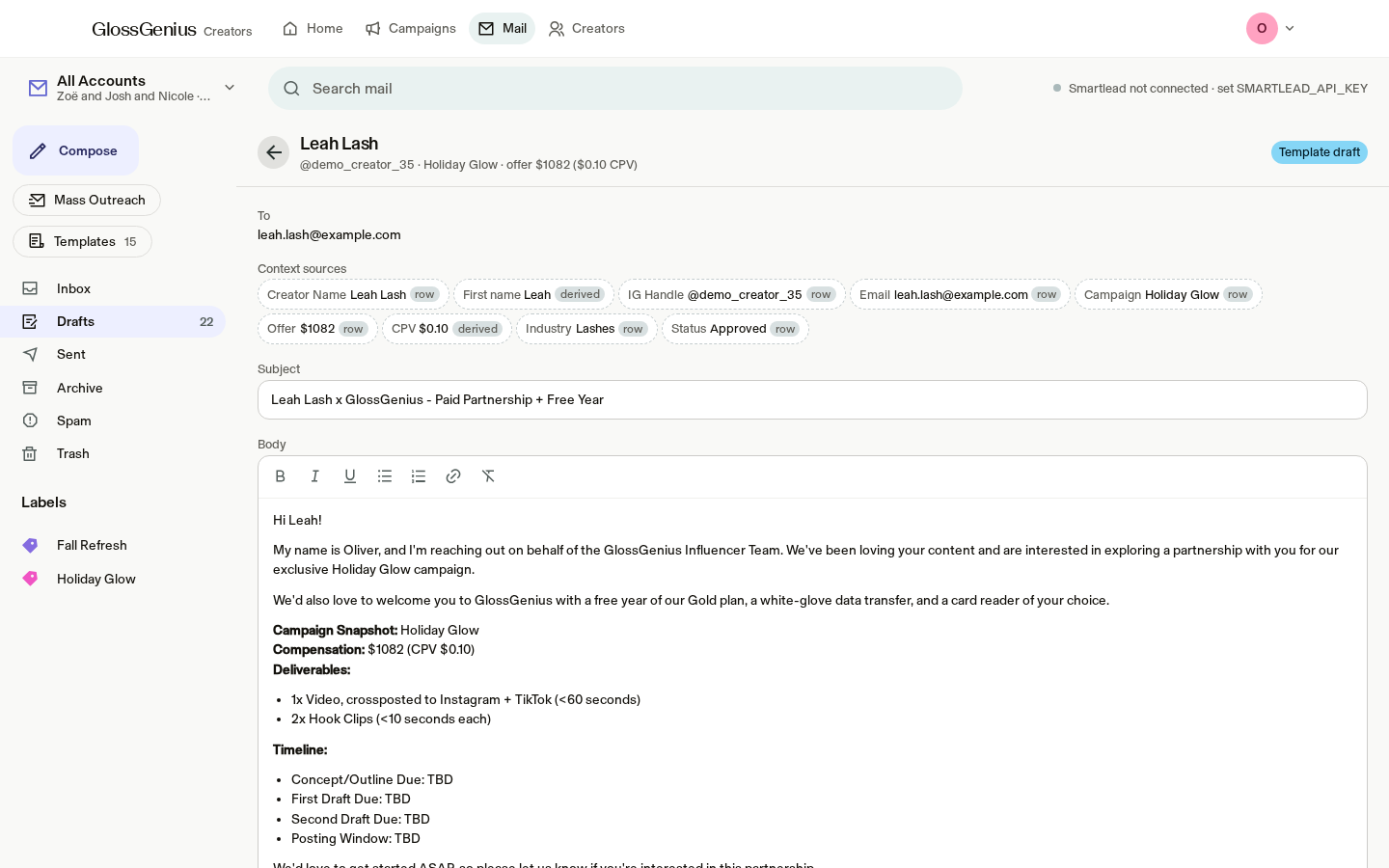
Create a personalized draft for each approved creator from your templates. Review drafts, approve the sending queue and manage team inboxes.

needed

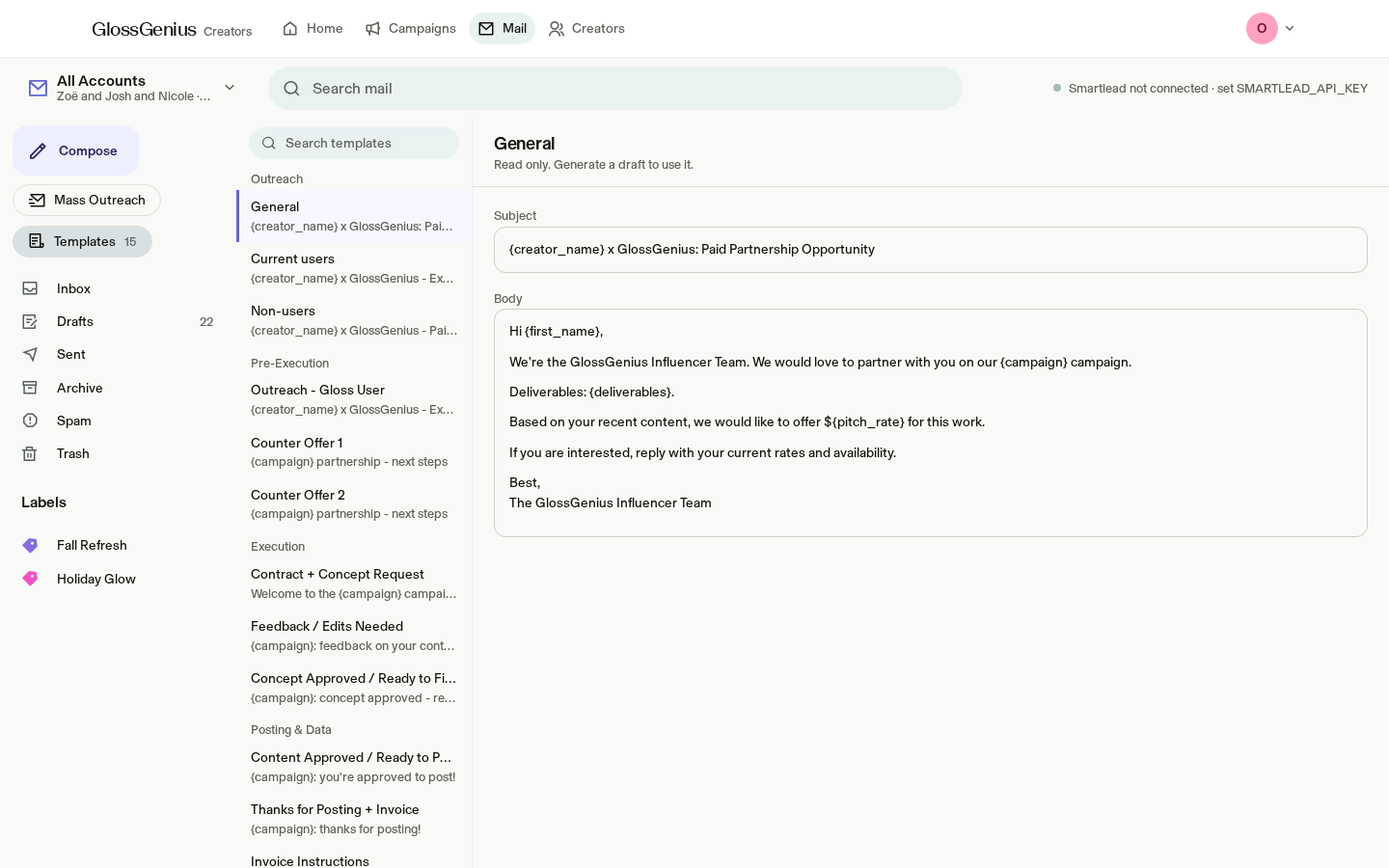
Messages currently go only to our test inbox. Decide when to enable real sending. Templates can't be edited in the app yet.

Contracting

30h
In progress~8-10 weeks
where in the app

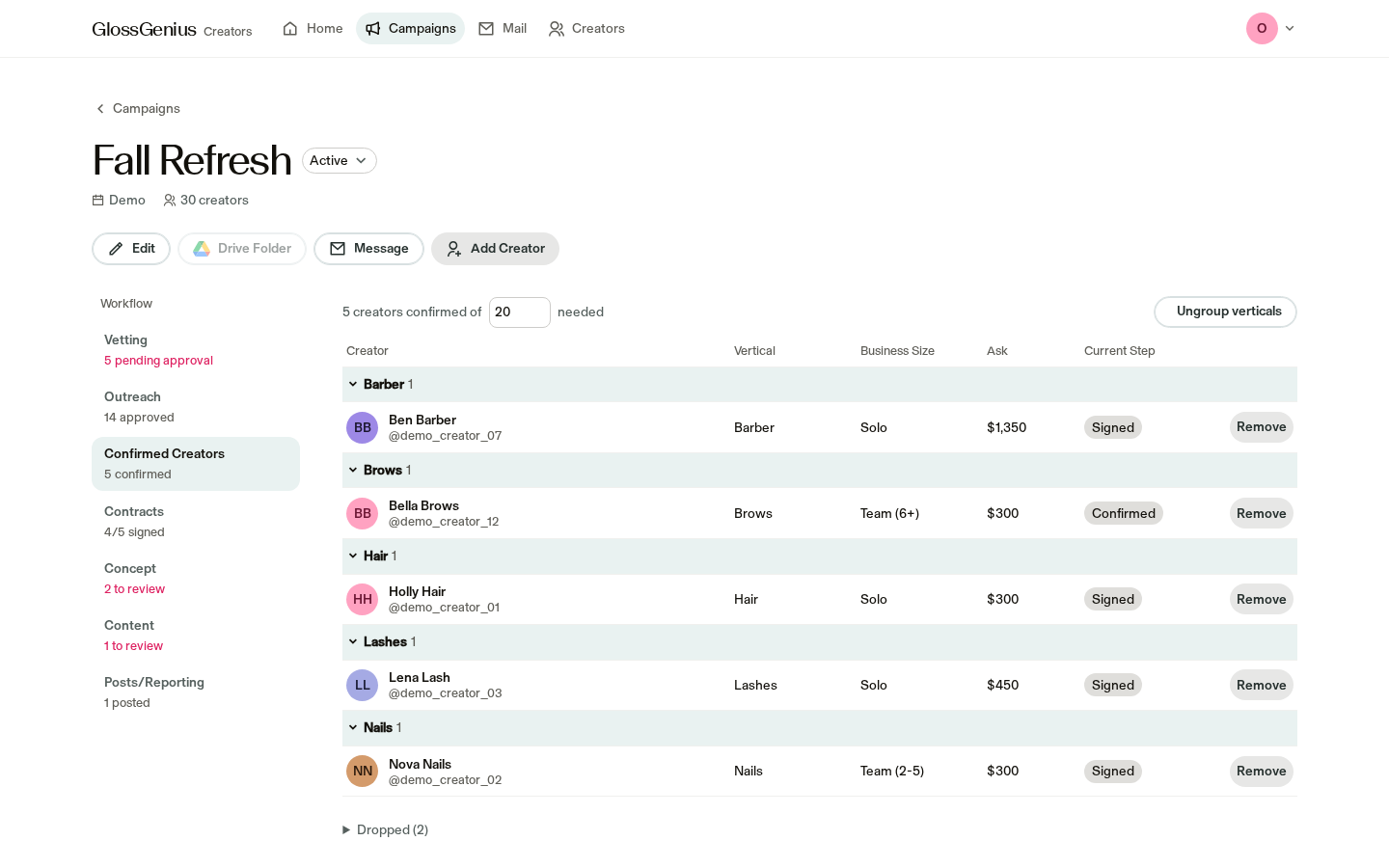
Confirmed creators · Contracts

today

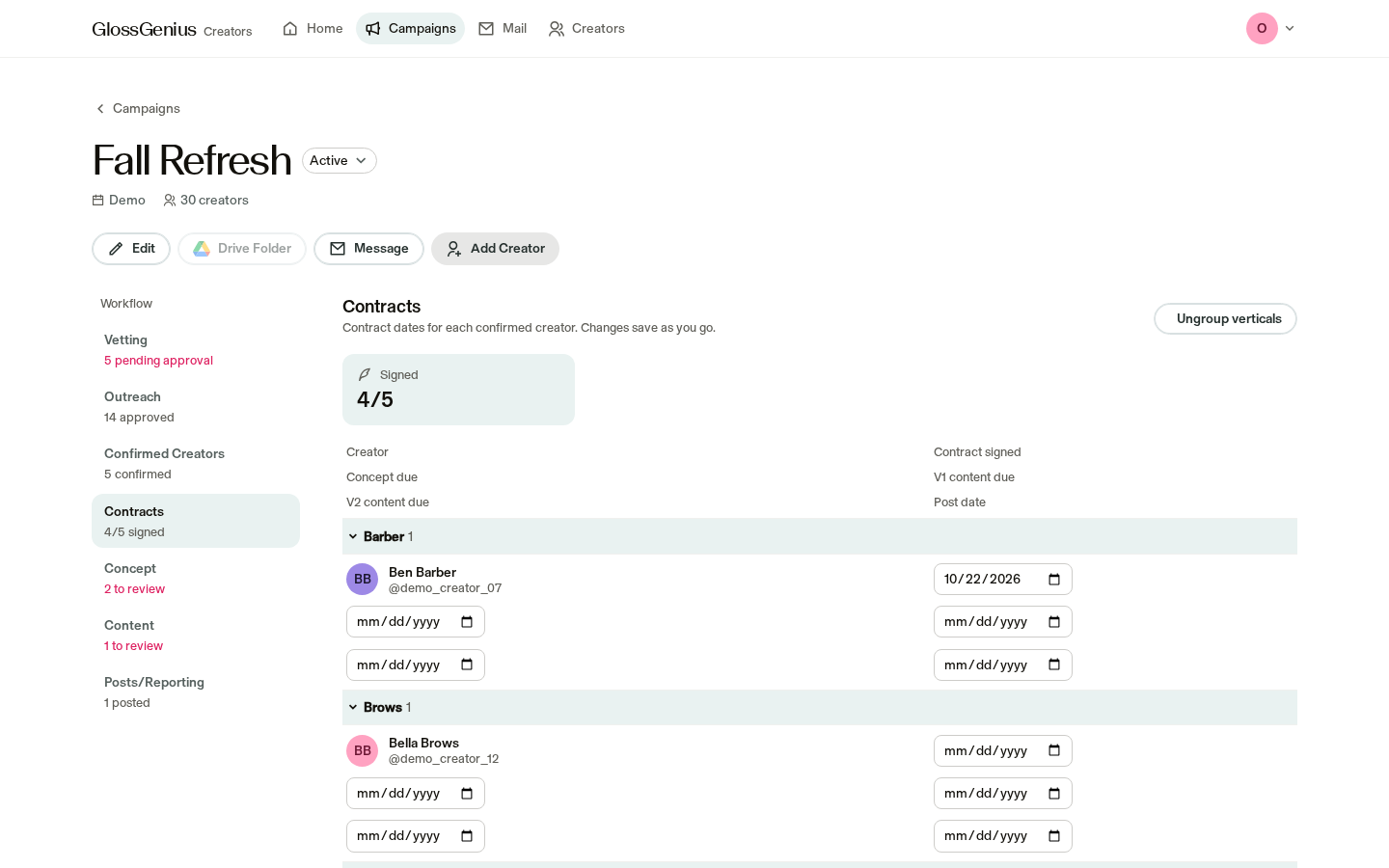
The Contracts tab tracks contract status and key dates for each creator.

needed

Contracts can't be sent or signed in the app yet. Full automation is waiting on legal review; Josh's partial automation sits outside the app.

03 / 46Terminal AI
/ job map

The job map

Jobs 5–8 of 8

Editing rounds & feedback

100h
Ready~8-10 weeks
where in the app

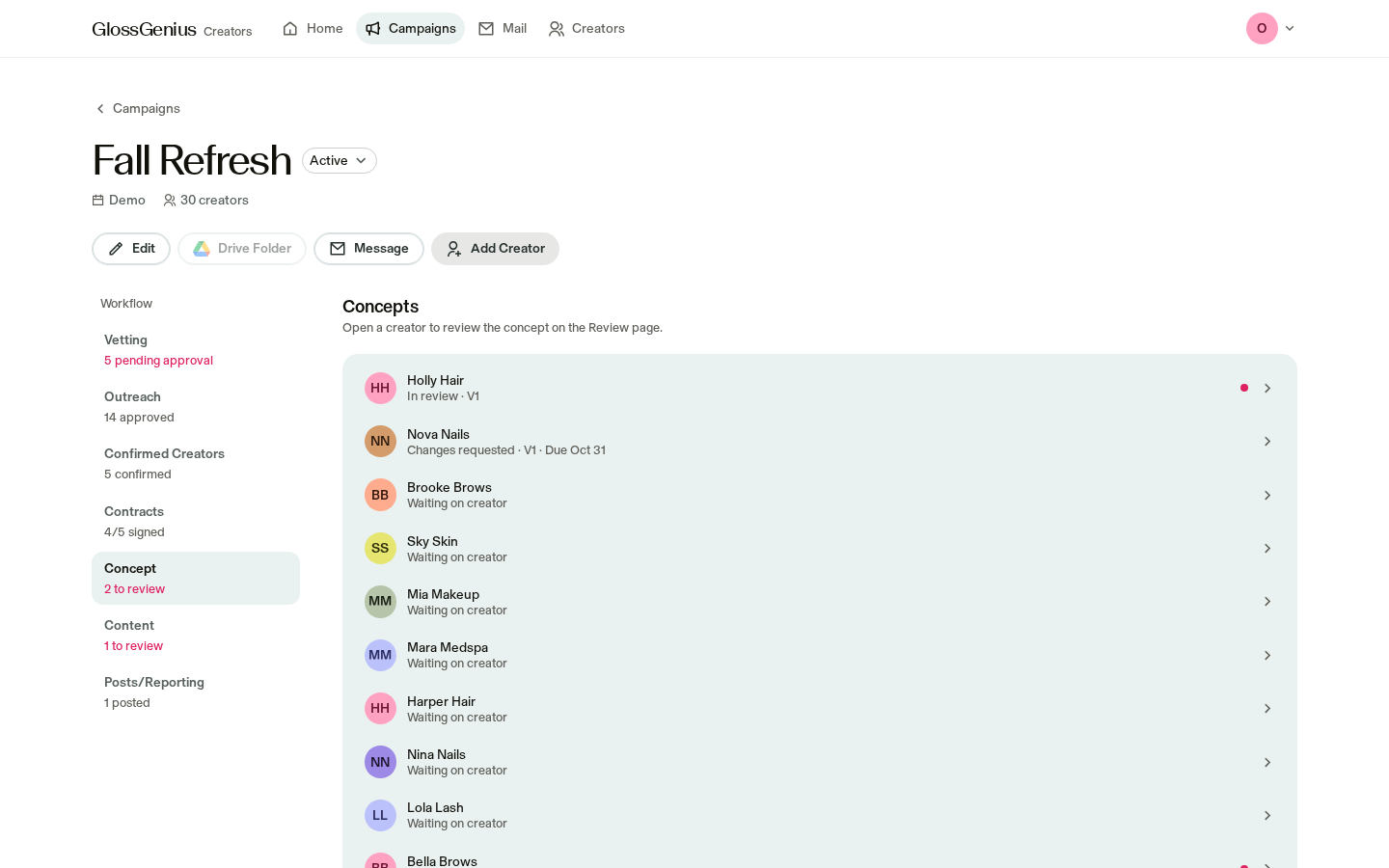
Review · Home · Campaign concepts and content

today

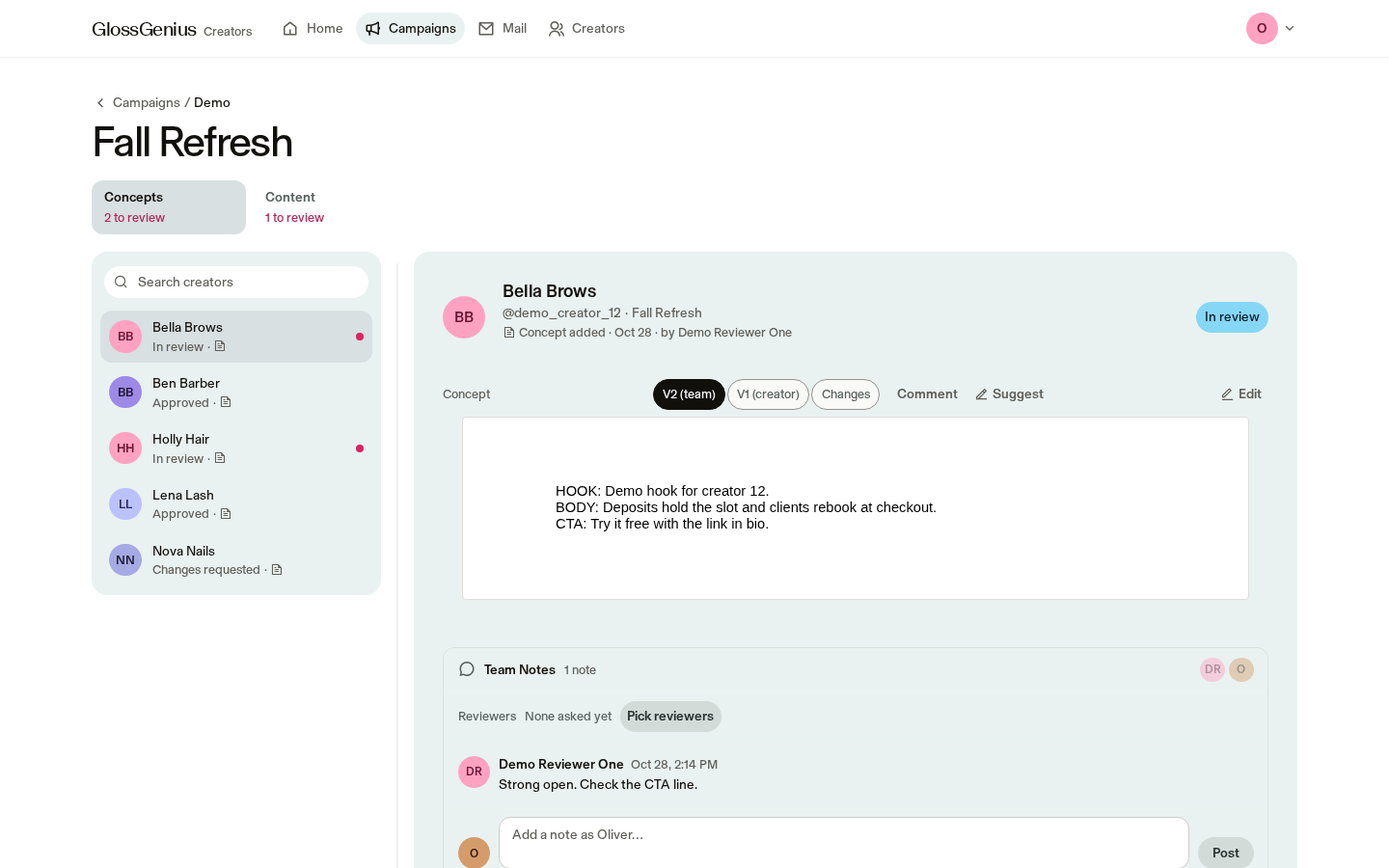
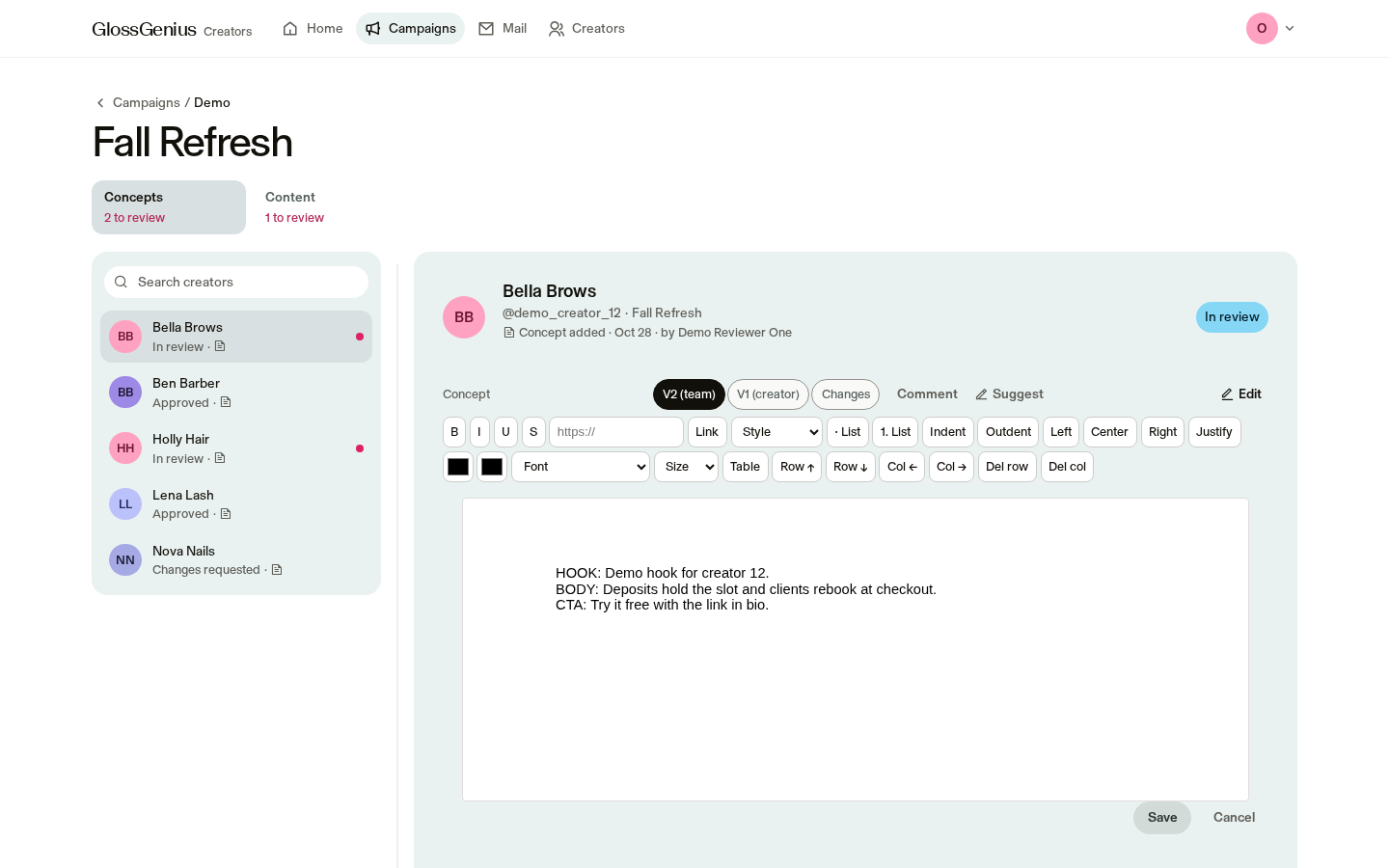
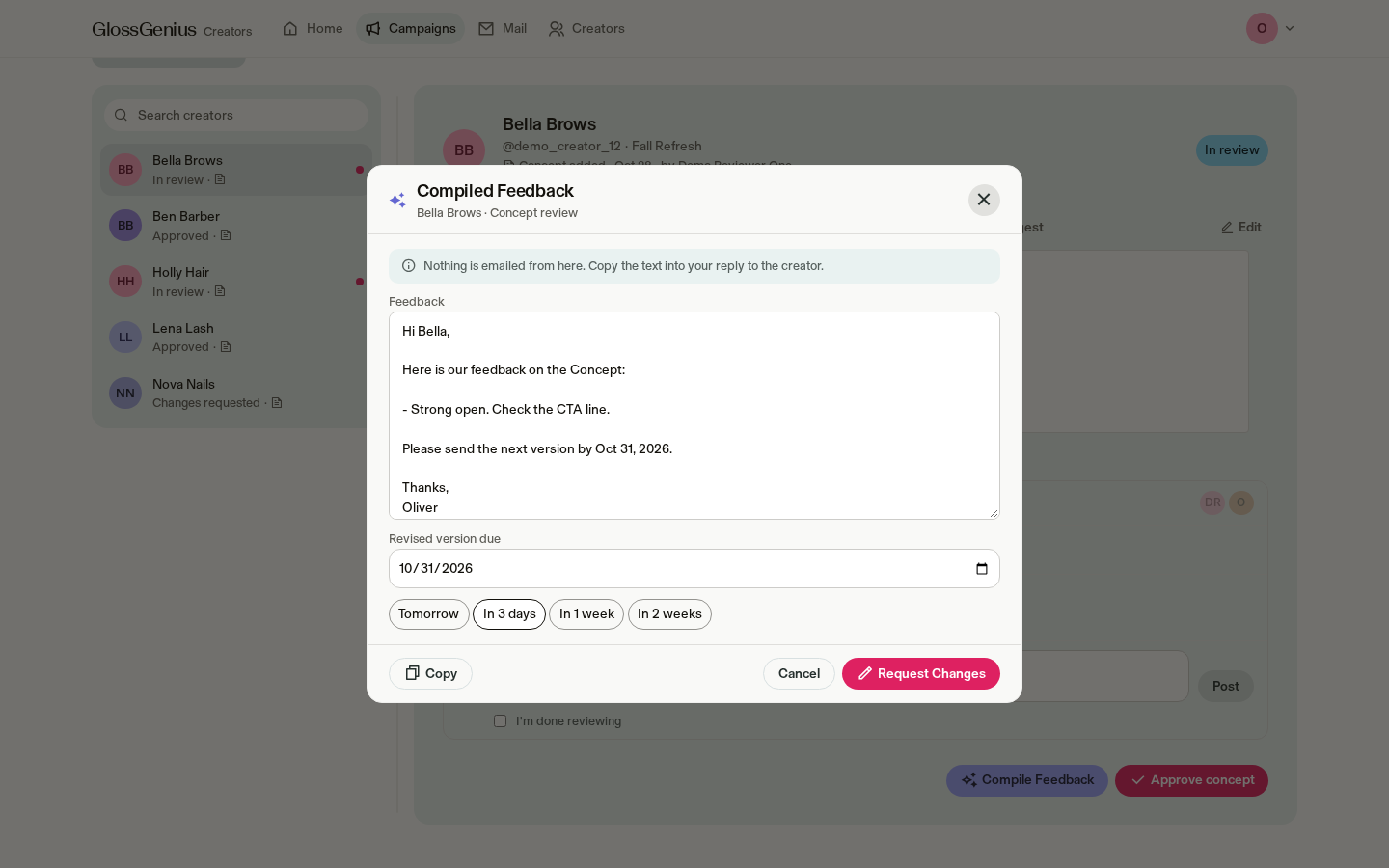
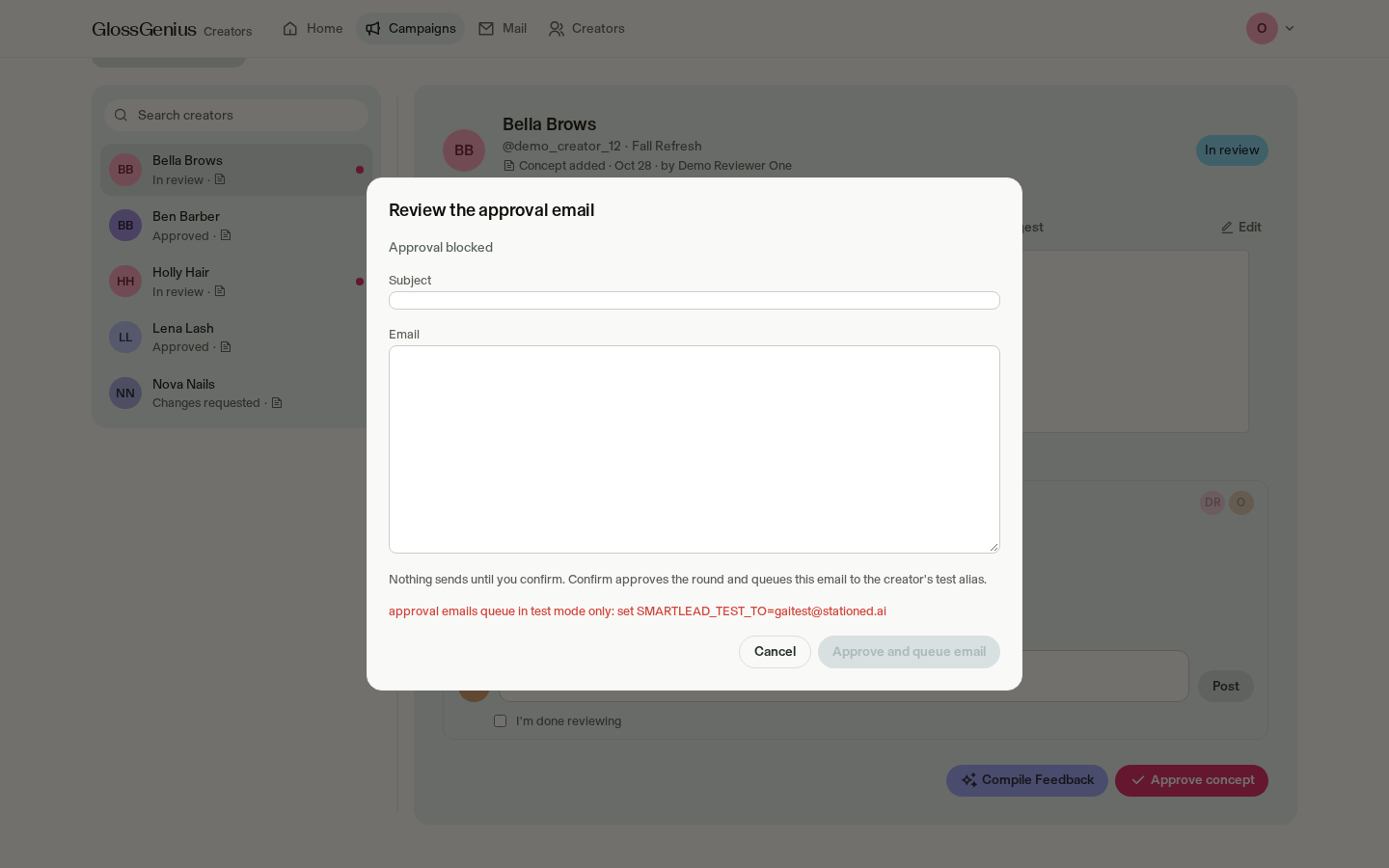
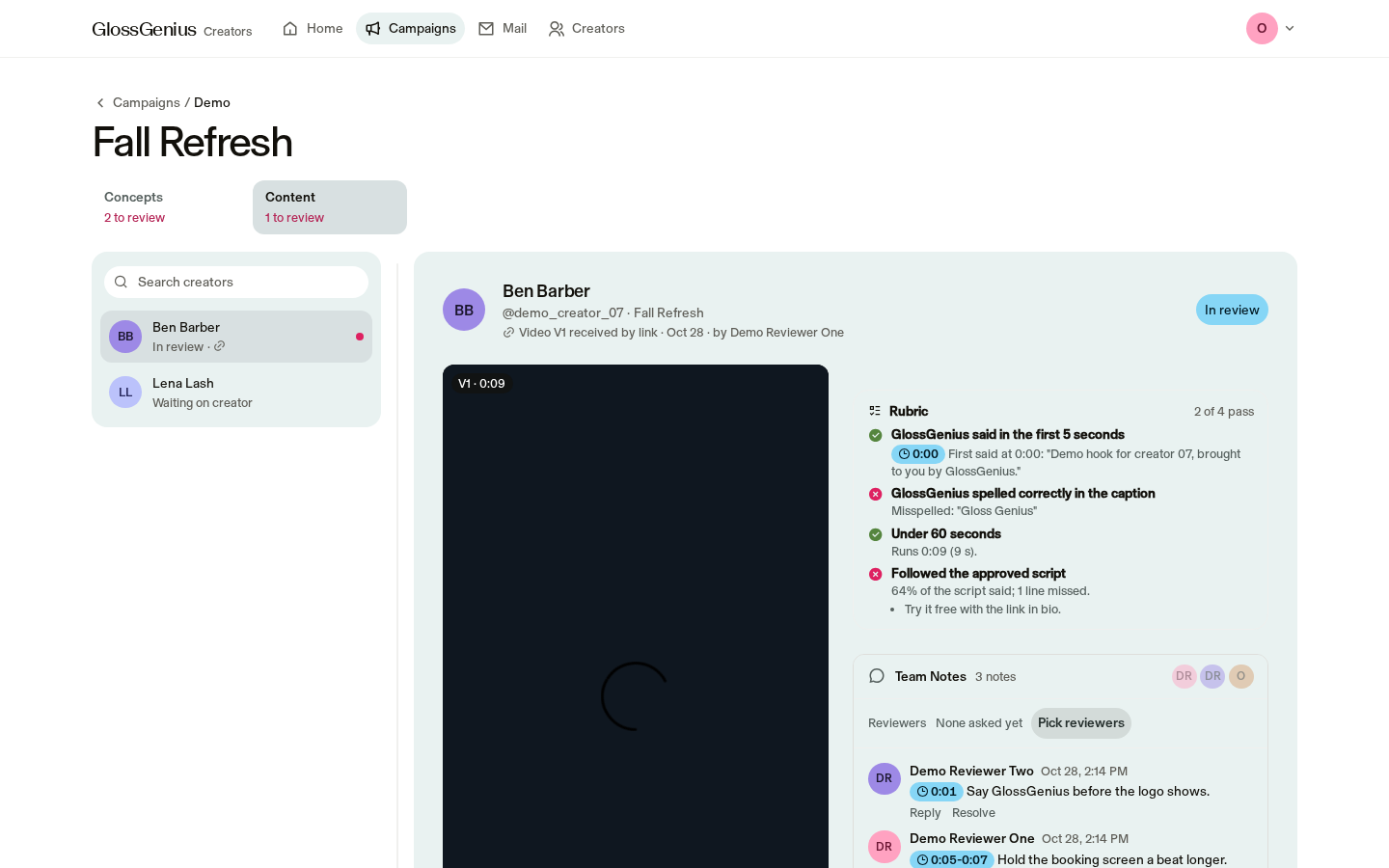
Compare review versions, edit scripts, leave comments, add notes to video moments and check review criteria. Choose reviewers and notify your team in Slack once Slack is connected. Feedback emails are prepared from notes, approvals show the email first, and updates sync with Google Docs.

needed

AI first-pass feedback isn't switched on yet. There is no automatic flag for language your team considers too downmarket, and feedback emails use notes in the app, not Slack threads.

Posting & performance tracking

40h
Built, not
switched on
~8-10 weeks + EOQ
where in the app

Campaign posts and reporting · Content reports · creator reporting folder

today

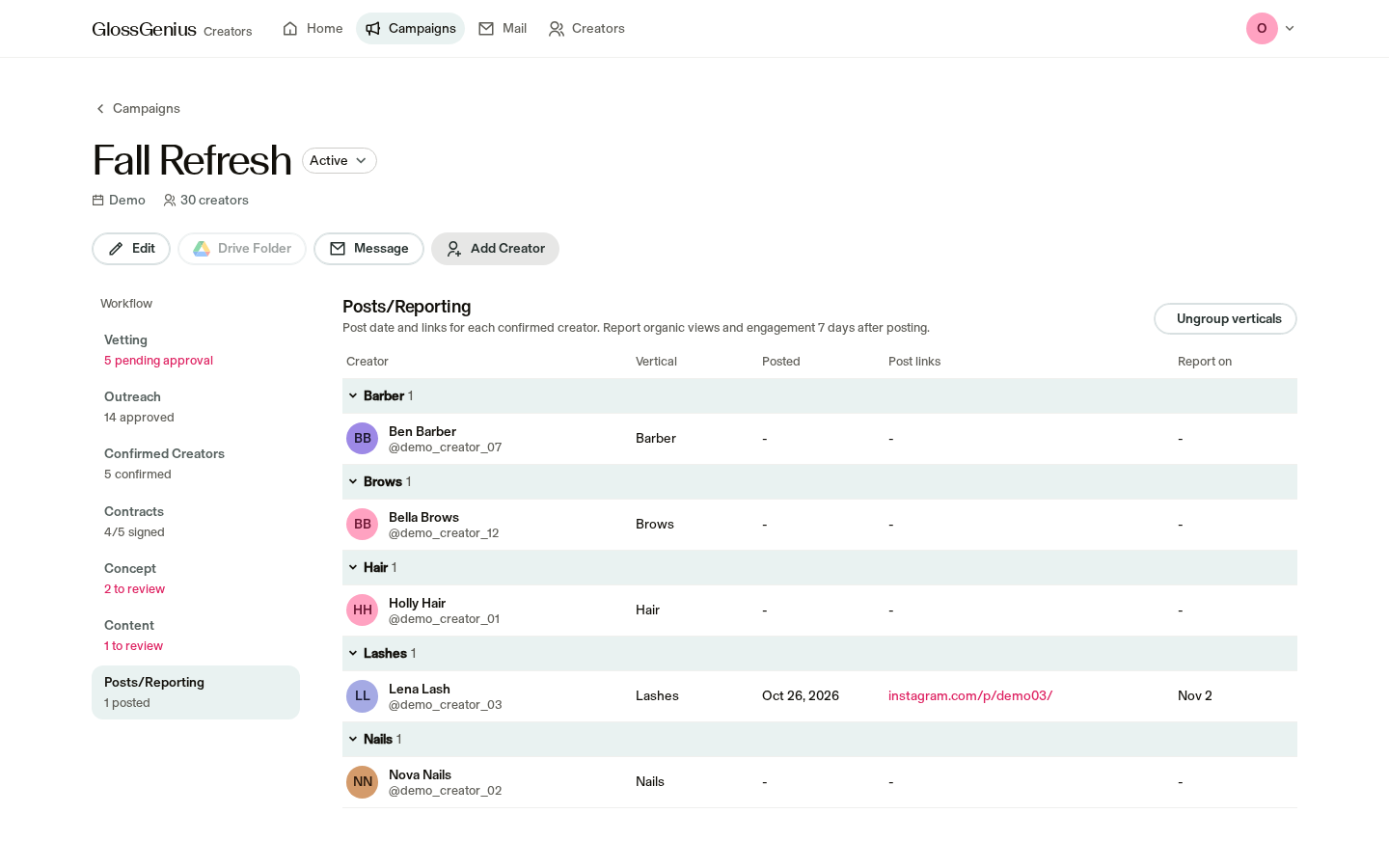
Record post links, post dates and seven-day report dates. Seven-day reports can include views, engagement rate, cost per view and an AI summary, but aren't switched on yet.

needed

Paid Meta results aren't included yet, and there is no end-of-quarter report yet.

Creative insights

10h
Not built yet~1-2 weeks
where in the app

No screen yet.

today

Creative insights aren't in the app yet. Your team uses Archive for now.

needed

Later: bring together insights from tracked posts.

Tracking & pacing (whole funnel)

48h
In progress~12 weeks + next quarter
where in the app

Home cards · Campaign numbers

today

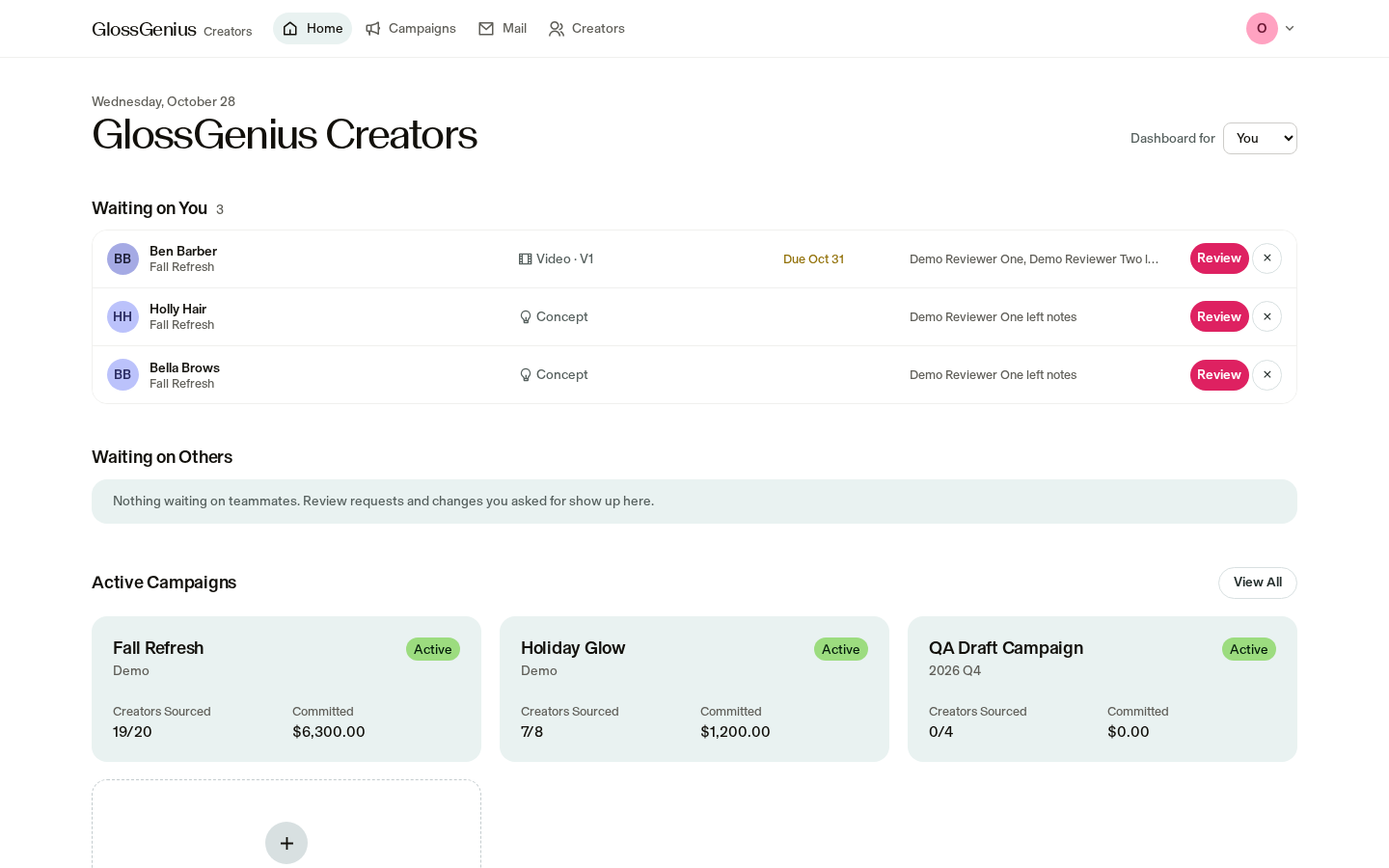
Home shows creators sourced vs. target and committed spend. Campaign and brief downloads are available.

needed

There is no on-screen budget-and-pacing view, follower-size breakdown or progress-to-goal view. Downloads don't have an on-screen button, and Google Sheets updates aren't switched on.

04 / 46Terminal AI
/ gaps

What isn't covered yet

FeatureDetail
Brief ideation and approvals (~20 hr/q)No screen yet. Briefs live in Google Docs and Slides. No brief upload or first-draft help.
Creative insights (~10 hr/q)Not built. You're using Archive's tool for now.
Contract sending and signingThe Contracts tab tracks status and dates only. No DocuSign; Josh's automation sits outside the app and full automation is blocked by legal.
Paid performanceMeta metrics aren't pulled in yet, so organic and paid aren't in one place. No end-of-quarter report yet.
Pacing viewNo on-screen % to goal by vertical, business size or follower size. Today it's a download without a button.
Editing time-saversNo automatic flag for downmarket language. Feedback emails are drafted from notes in the app, not from your Slack threads.
Asset trackingYour Asana video database inputs aren't connected.
05 / 46Terminal AI
/ capabilities

Critical capabilities

CapabilityPriorityStatusWhereNotes
Creator detailsMust haveBuilt, not
switched on
Creators list · Automatic detailsAdds follower count, typical views, engagement, email and rate flags automatically.
Outreach draftsMust haveReadyCampaign outreach · Mail draftsCreates template-based drafts with creator and campaign details. AI rewriting is built but not switched on yet.
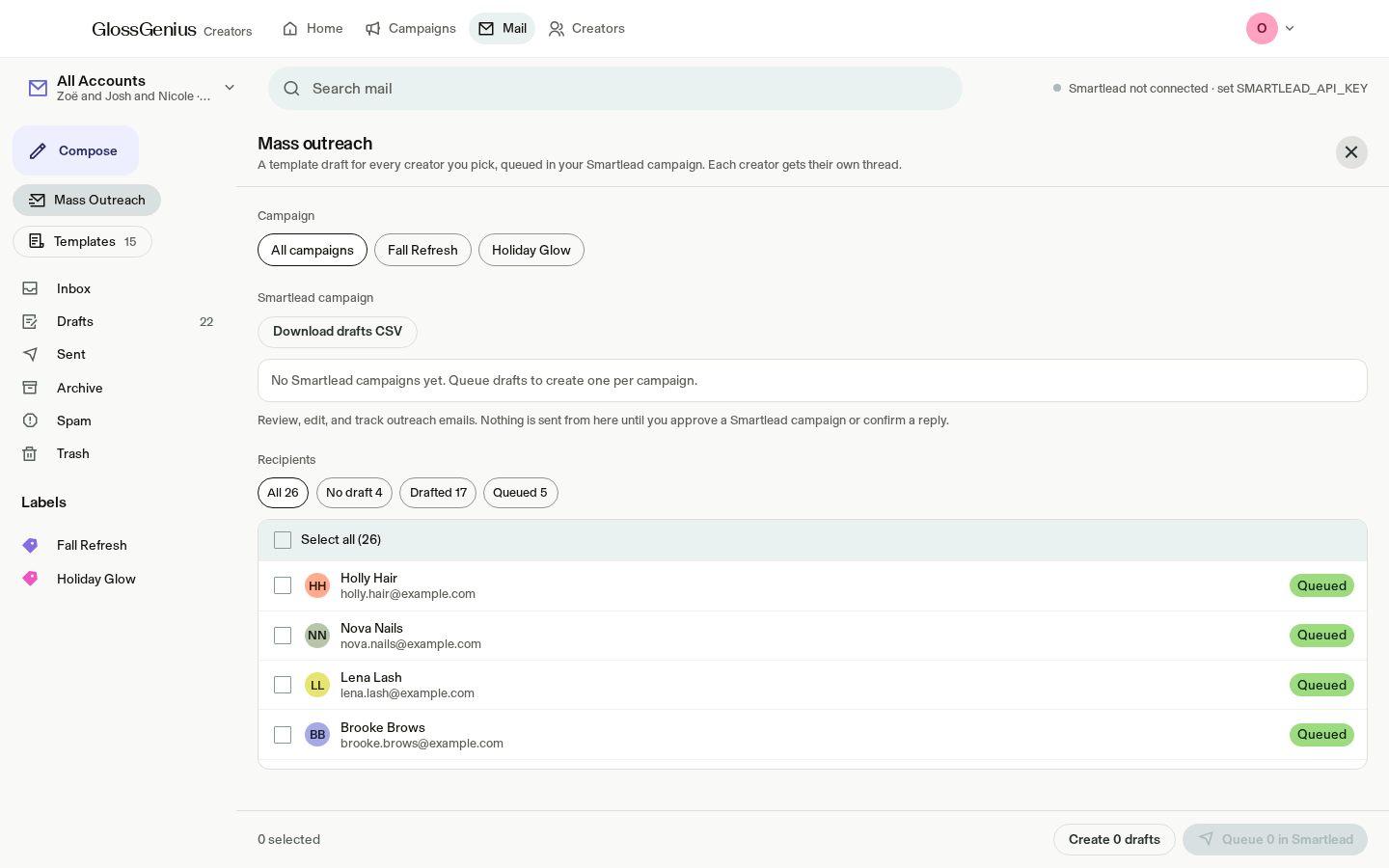
Outreach sendingMust haveIn progressMail · Mass outreachYour team can review the sending queue in test mode; messages go only to our test inbox. Real sending needs a go-ahead.
Concept documentsMust haveReadyCreator profile · ReviewCreates the concept document in the creator's folder and keeps the review round in step. Google needs to be connected.
Google DriveMust haveReadyCampaign folder · Creator folderCreates campaign and creator folders. Document updates can be backed up and restored when Google is connected.
Editing and reviewMust haveReadyReview · HomeThe most complete part of the app, with review rounds, notes and approvals.
Campaign downloadsMust haveIn progressCampaign and brief downloadsNumbers can be downloaded, but there is no button on the page yet. Google Sheets updates are built but not switched on.
06 / 46Terminal AI
/ journey

The journey, end to end

01

Home and team

See who's working and what needs your attention

screens

Team profiles · Home · Waiting on you and others

jobs
  • Editing rounds & feedback 100h
  • Tracking & pacing (whole funnel) 48h
02

Campaign setup

Create a campaign and set its goals

screens

Campaign list · New campaign · Edit campaign

jobs
  • Brief ideation & approvals 20h
  • Tracking & pacing (whole funnel) 48h
03

Sourcing & vetting

Find creators and decide who to approach

screens

Creators · Creator profiles · Vetting

jobs
  • Sourcing 50h
04

Outreach

Prepare messages and follow up

screens

Campaign outreach · Mail

jobs
  • Outreach 65h
05

Confirmed creators & contracts

Confirm the roster and key dates

screens

Confirmed creators · Contracts

jobs
  • Contracting 30h
06

Editing & review

Review concepts and content

screens

Review · Campaign concepts and content

jobs
  • Editing rounds & feedback 100h
07

Posting & reporting

Publish posts and review results

screens

Posts · Reports · Downloads

jobs
  • Posting & performance tracking 40h
  • Creative insights 10h
  • Tracking & pacing (whole funnel) 48h
07 / 46Terminal AI
/ home and team

Home and team

See who's working and what needs your attention

screens

Team profiles · Home · Waiting on you and others

jobs served

Editing rounds & feedback · 100h · Tracking & pacing (whole funnel) · 48h

08 / 46Terminal AI
/ home and team

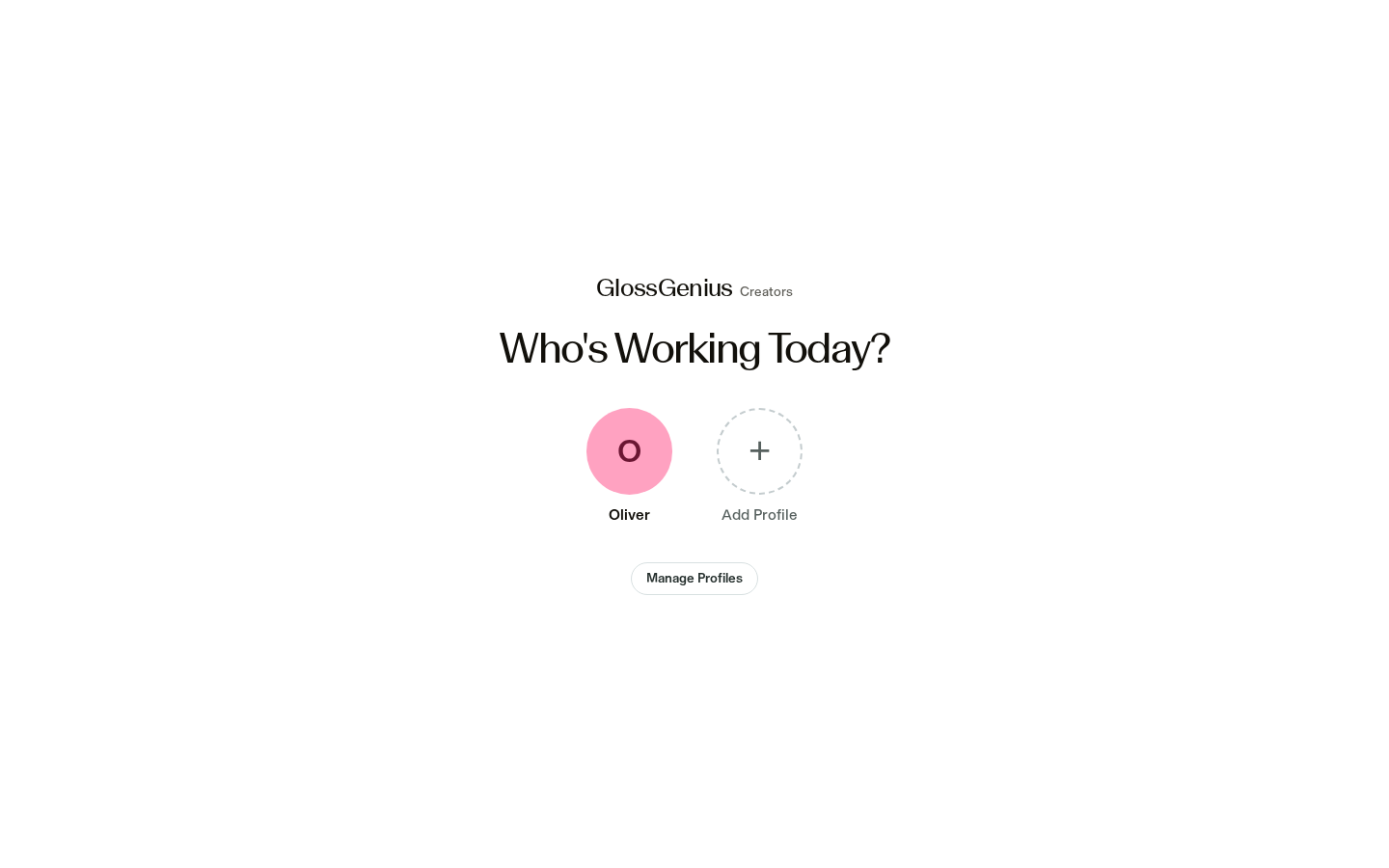
Who's working today

Ready
Who's working today screenshot
team decisionKeep as isImproveRemoveAdd to roadmap
09 / 46Terminal AI
/ home and team

Home

Ready
Home screenshot
team decisionKeep as isImproveRemoveAdd to roadmap
10 / 46Terminal AI
/ home and team

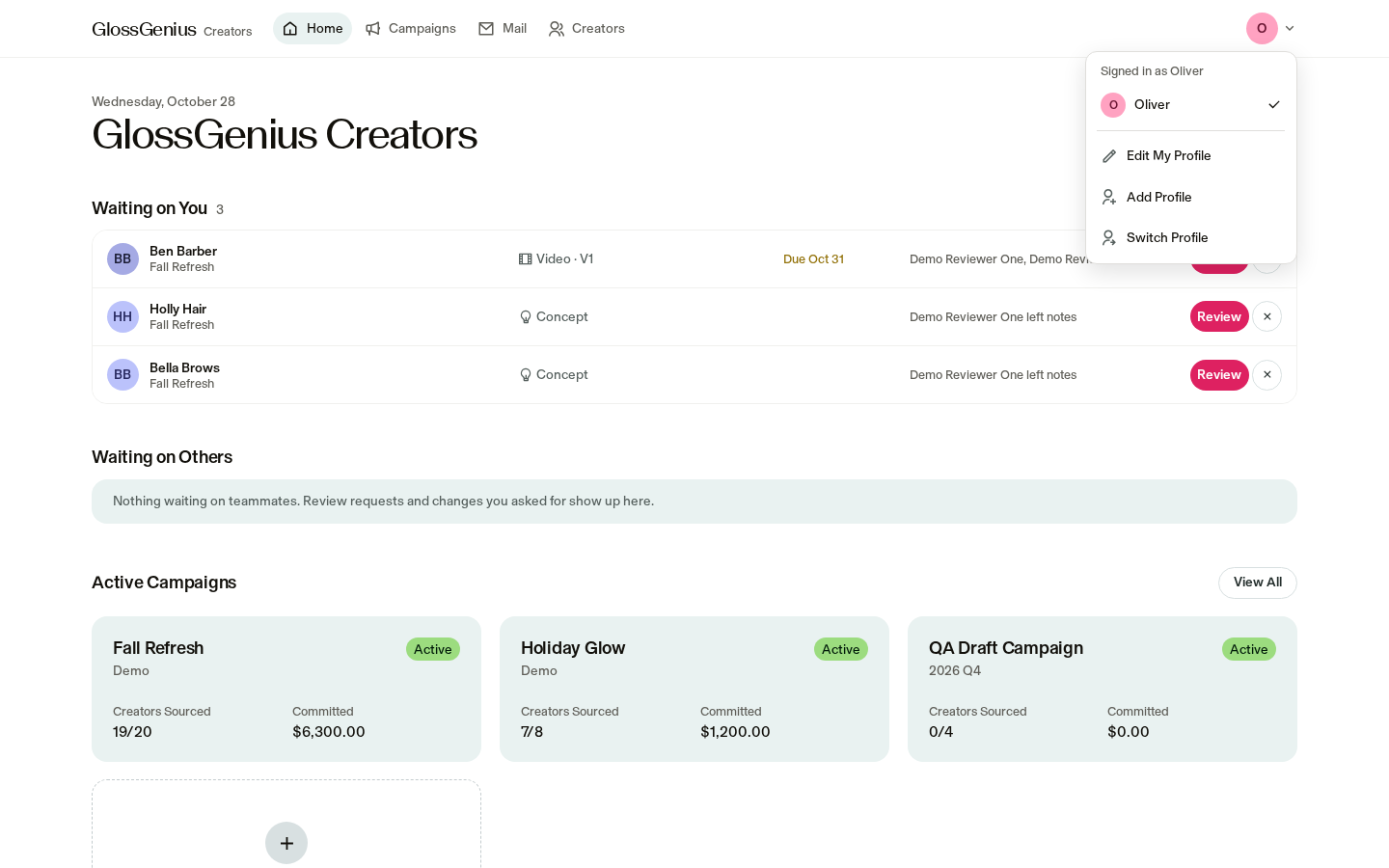
Avatar menu

Ready
Avatar menu screenshot
team decisionKeep as isImproveRemoveAdd to roadmap
11 / 46Terminal AI
/ campaign setup

Campaign setup

Create a campaign and set its goals

screens

Campaign list · New campaign · Edit campaign

jobs served

Brief ideation & approvals · 20h · Tracking & pacing (whole funnel) · 48h

12 / 46Terminal AI
/ campaign setup

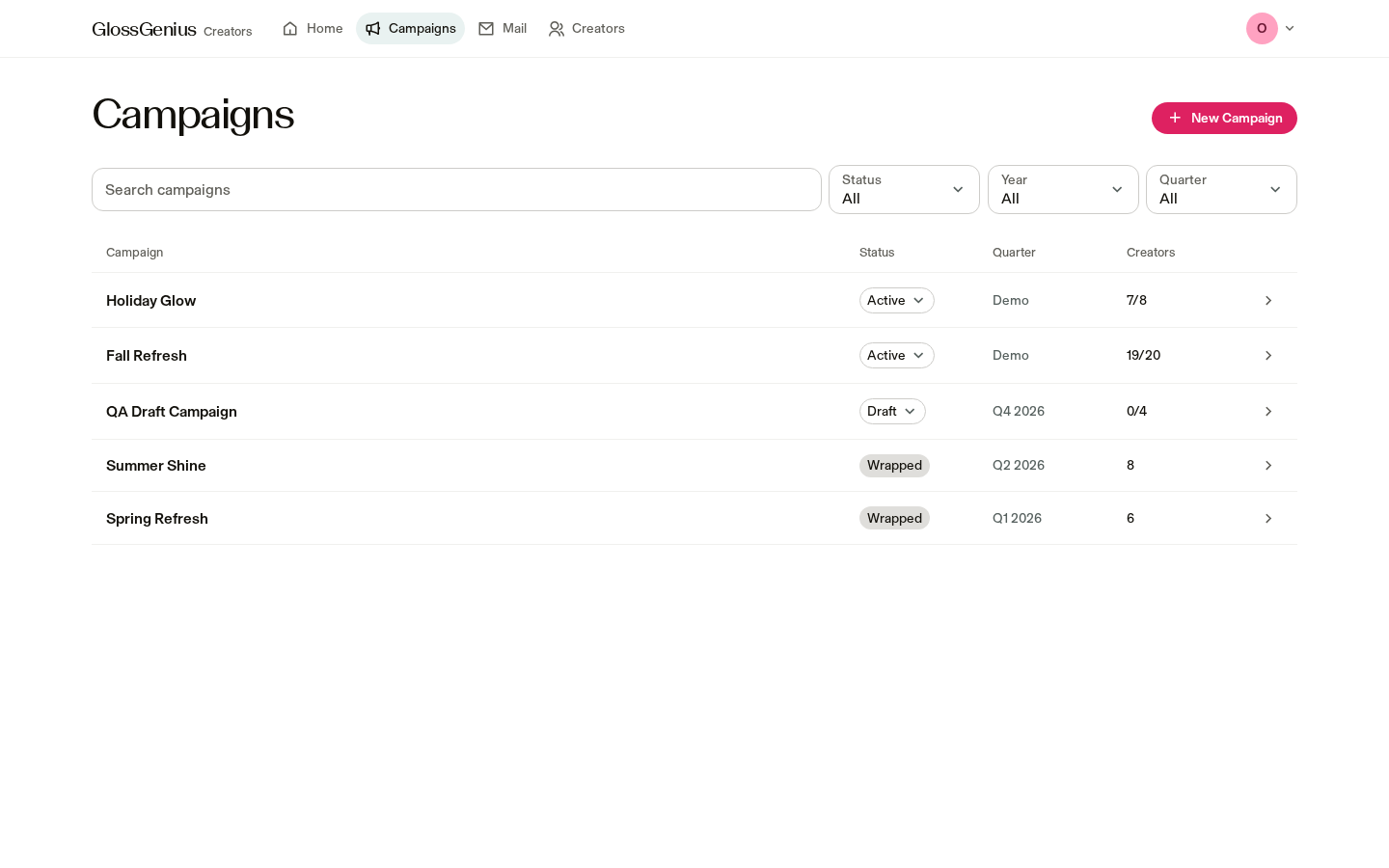
Campaign list

Ready
Campaign list screenshot
team decisionKeep as isImproveRemoveAdd to roadmap
13 / 46Terminal AI
/ campaign setup

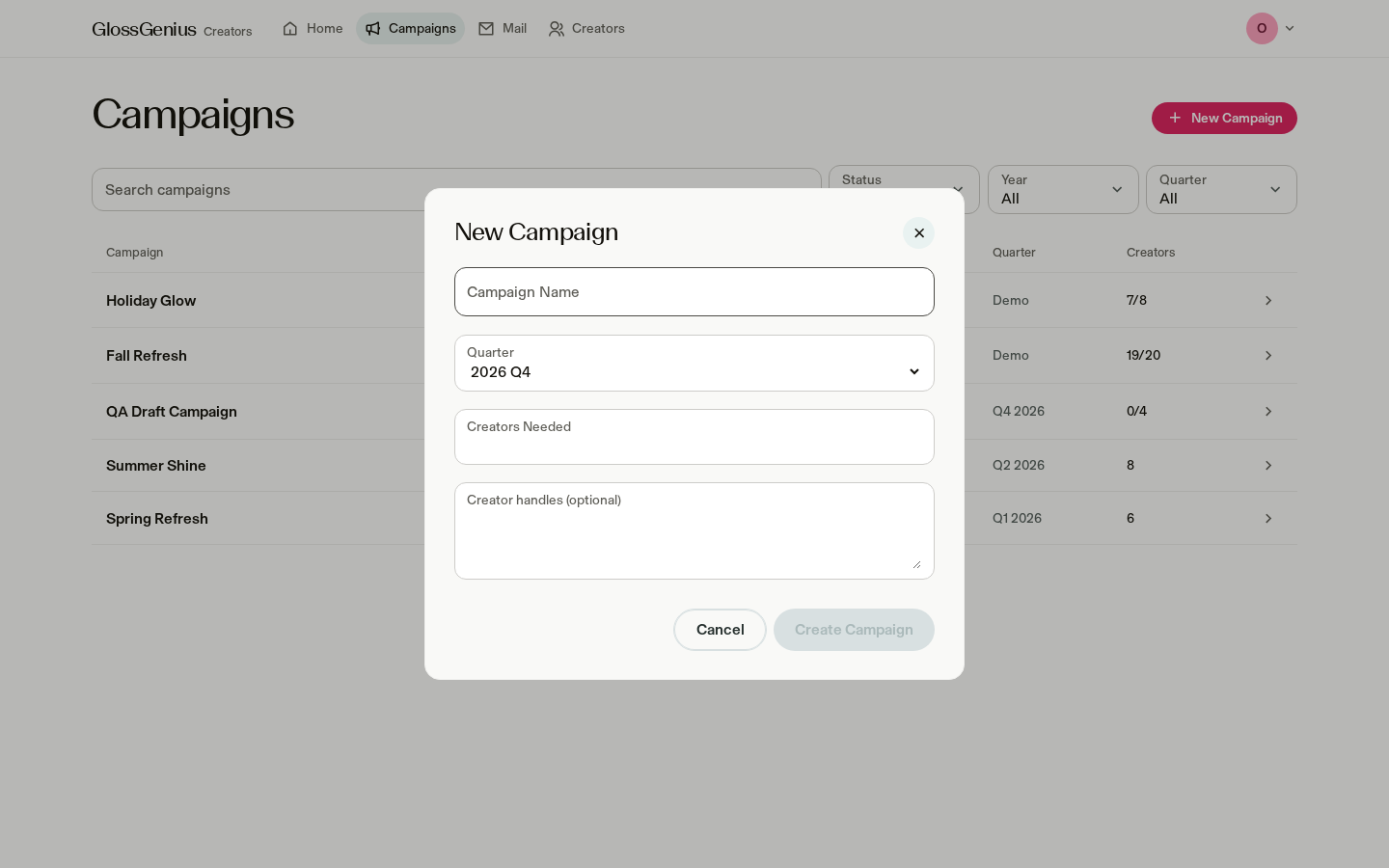
New campaign

Ready
New campaign screenshot
team decisionKeep as isImproveRemoveAdd to roadmap
14 / 46Terminal AI
/ campaign setup

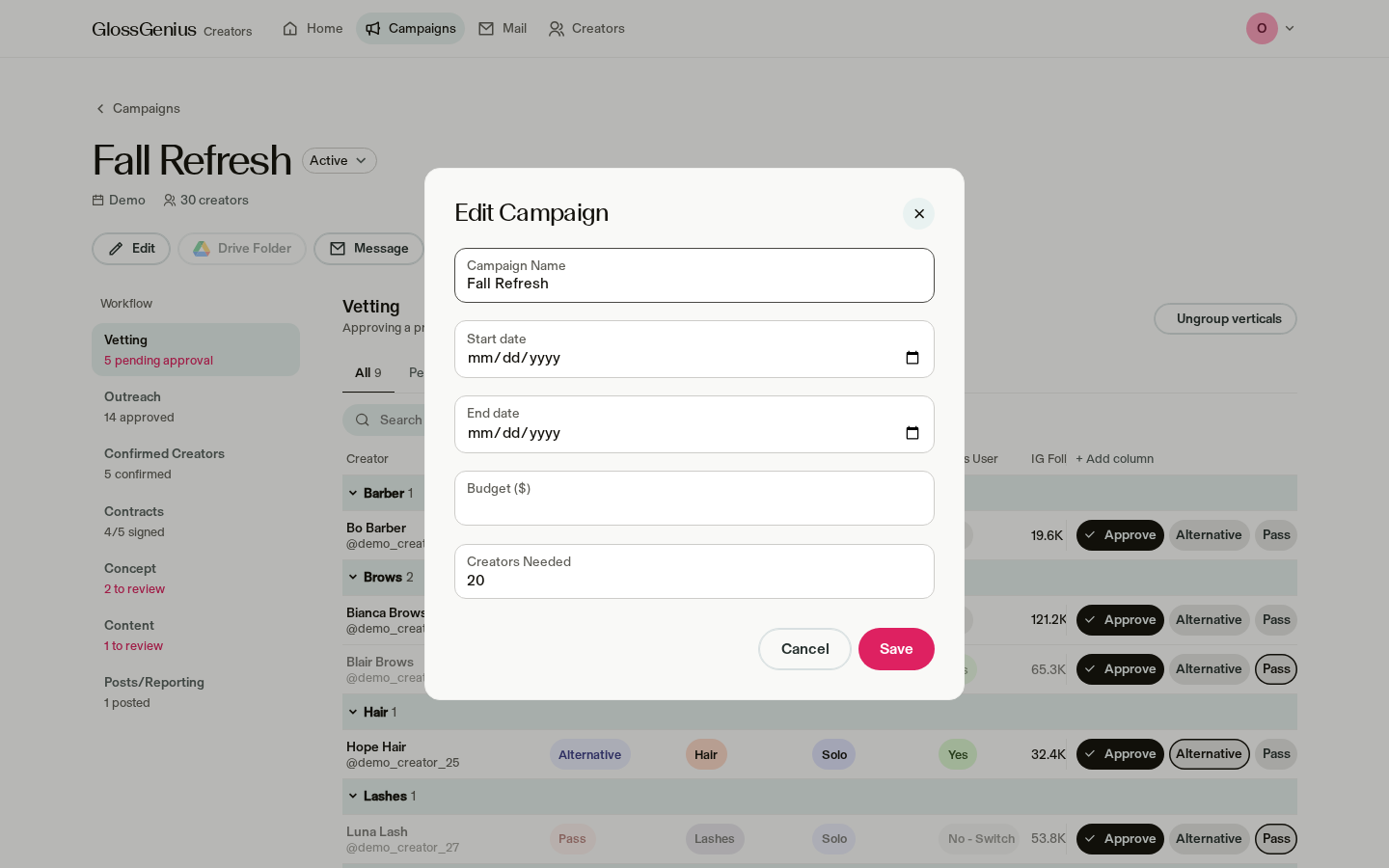
Edit campaign

Ready
Edit campaign screenshot
team decisionKeep as isImproveRemoveAdd to roadmap
15 / 46Terminal AI
/ sourcing & vetting

Sourcing & vetting

Find creators and decide who to approach

screens

Creators · Creator profiles · Vetting

jobs served

Sourcing · 50h

16 / 46Terminal AI
/ sourcing & vetting

Creators database

In progress
Creators database screenshot
team decisionKeep as isImproveRemoveAdd to roadmap
17 / 46Terminal AI
/ sourcing & vetting

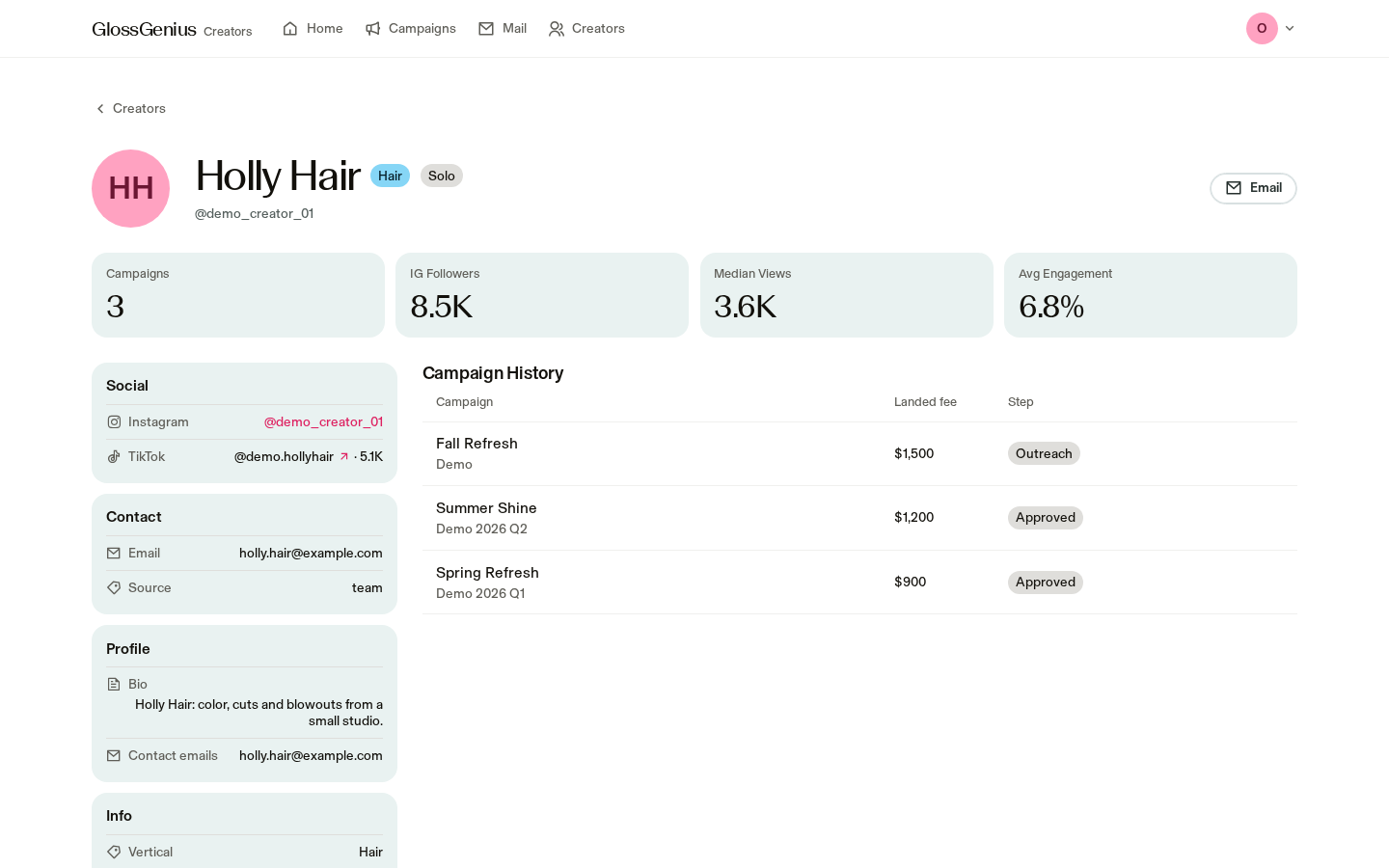
Creator profile

Ready
Creator profile screenshot
team decisionKeep as isImproveRemoveAdd to roadmap
18 / 46Terminal AI
/ sourcing & vetting

Vetting

Ready
Vetting screenshot
team decisionKeep as isImproveRemoveAdd to roadmap
19 / 46Terminal AI
/ sourcing & vetting

Add a creator

Ready
Add a creator screenshot
team decisionKeep as isImproveRemoveAdd to roadmap
20 / 46Terminal AI
/ outreach

Outreach

Prepare messages and follow up

screens

Campaign outreach · Mail

jobs served

Outreach · 65h

21 / 46Terminal AI
/ outreach

Outreach

Ready
Outreach screenshot
team decisionKeep as isImproveRemoveAdd to roadmap
22 / 46Terminal AI
/ outreach

Mass outreach

In progress
Mass outreach screenshot
team decisionKeep as isImproveRemoveAdd to roadmap
23 / 46Terminal AI
/ outreach

Draft editor

Ready
Draft editor screenshot
team decisionKeep as isImproveRemoveAdd to roadmap
24 / 46Terminal AI
/ outreach

Templates

In progress
Templates screenshot
team decisionKeep as isImproveRemoveAdd to roadmap
25 / 46Terminal AI
/ outreach

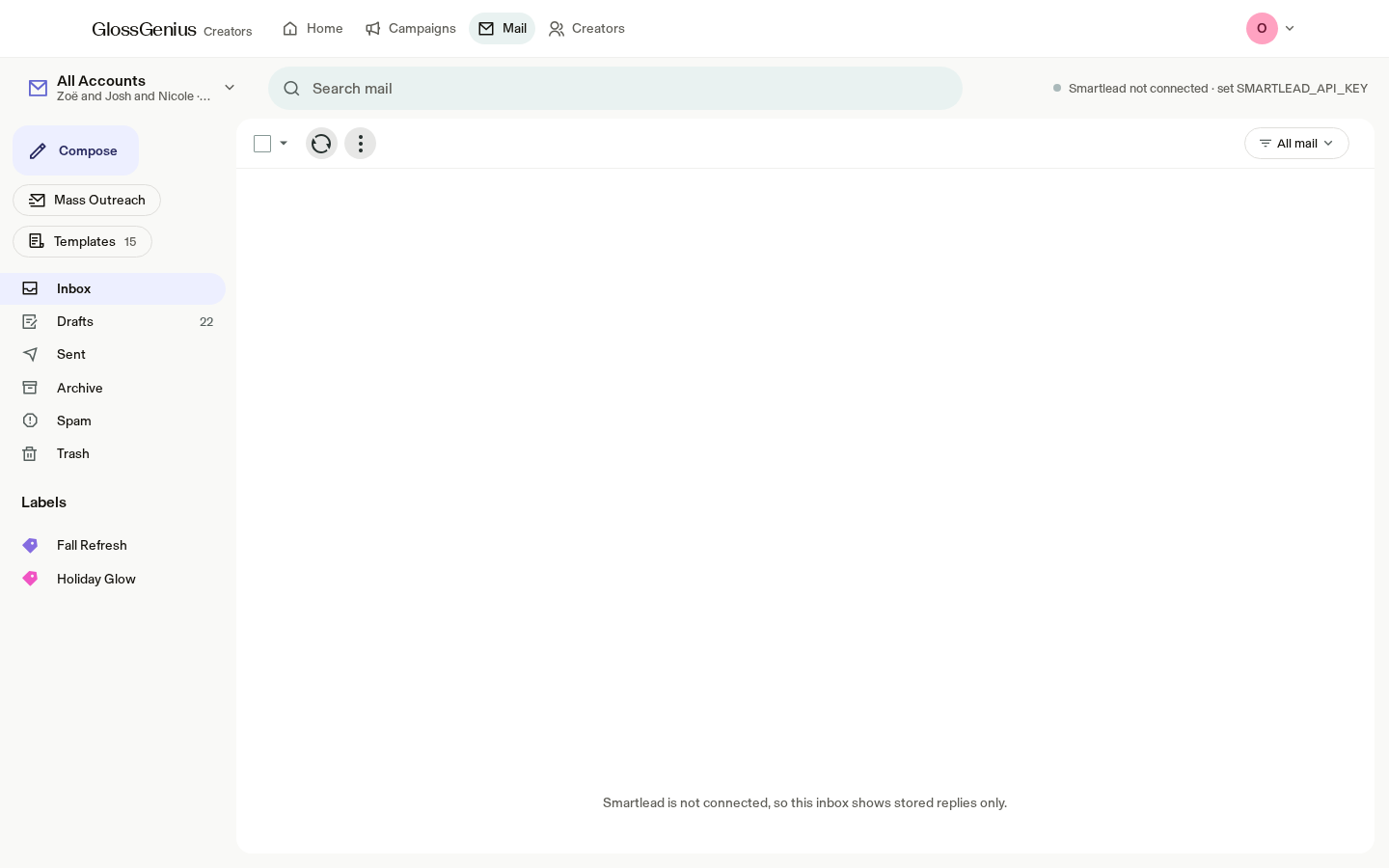
Mail inbox

Ready
Mail inbox screenshot
team decisionKeep as isImproveRemoveAdd to roadmap
26 / 46Terminal AI
/ confirmed creators & contracts

Confirmed creators & contracts

Confirm the roster and key dates

screens

Confirmed creators · Contracts

jobs served

Contracting · 30h

27 / 46Terminal AI
/ confirmed creators & contracts

Confirmed creators

Ready
Confirmed creators screenshot
team decisionKeep as isImproveRemoveAdd to roadmap
28 / 46Terminal AI
/ confirmed creators & contracts

Contracts

In progress
Contracts screenshot
team decisionKeep as isImproveRemoveAdd to roadmap
29 / 46Terminal AI
/ editing & review

Editing & review

Review concepts and content

screens

Review · Campaign concepts and content

jobs served

Editing rounds & feedback · 100h

30 / 46Terminal AI
/ editing & review

Concept tab

Ready
Concept tab screenshot
team decisionKeep as isImproveRemoveAdd to roadmap
31 / 46Terminal AI
/ editing & review

Concept review

Ready
Concept review screenshot
team decisionKeep as isImproveRemoveAdd to roadmap
32 / 46Terminal AI
/ editing & review

Script editor

Ready
Script editor screenshot
team decisionKeep as isImproveRemoveAdd to roadmap
33 / 46Terminal AI
/ editing & review

Compiled feedback

In progress
Compiled feedback screenshot
team decisionKeep as isImproveRemoveAdd to roadmap
34 / 46Terminal AI
/ editing & review

Approve: review the email

Ready
Approve: review the email screenshot
team decisionKeep as isImproveRemoveAdd to roadmap
35 / 46Terminal AI
/ editing & review

Content review

Ready
Content review screenshot
team decisionKeep as isImproveRemoveAdd to roadmap
36 / 46Terminal AI
/ posting & reporting

Posting & reporting

Publish posts and review results

screens

Posts · Reports · Downloads

jobs served

Posting & performance tracking · 40h · Creative insights · 10h · Tracking & pacing (whole funnel) · 48h

37 / 46Terminal AI
/ posting & reporting

Posts and reporting

In progress
Posts and reporting screenshot
team decisionKeep as isImproveRemoveAdd to roadmap
38 / 46Terminal AI
/ posting & reporting

Content tab: reports

Built, not
switched on
Content tab: reports screenshot
team decisionKeep as isImproveRemoveAdd to roadmap
39 / 46Terminal AI
/ feedback

Feedback tracker

Your team's feedback, by area and current state

AreaFeedbackStatusNotes
CampaignsFlow: Vetting → Outreach → Confirmed → Contracts → Concept → Content → Posts and reportingDoneCampaign steps appear in that order
CampaignsOutreach fills as soon as a creator is approvedDone
CampaignsSort Active first, most recent firstDone
CampaignsStart a campaign with no creatorsDone
CampaignsEdit name, dates, budget, creators neededDone
CampaignsUpload a spreadsheet of creatorsDone
CampaignsDeliverables, usage rights and rate per creatorIn progressDeliverables and rates can be included in a spreadsheet; usage rights aren't captured yet
CampaignsMultiple briefs per campaignNot built yet
StatusesPending approval / Approved / Alternative / PassDone
ProfilesProfile information, Drive under history, linked social accounts and editingDone
ReviewApprove concept or content shows the email firstDone
EmailsReview templates and add new onesOpenTemplates can be viewed but not edited in the app
40 / 46Terminal AI
/ feedback

Feedback tracker (continued)

Your team's feedback, by area and current state

AreaFeedbackStatusNotes
HomeDismiss a task from Waiting on YouDone
CreatorsAdd and edit creatorsDone
CreatorsStar ratings and reviewsNot built yet
CreatorsFilter GlossGenius creators vs. other creatorsDone
StretchQuick actions: Approve, Pass, Flag, Don't work withIn progressApprove, Alternative and Pass are available
StretchChoose who approves a creatorNot built yet
StretchCompare creator and team concept versionsDoneThe team version is sent on approval
StretchChoose reviewers and notify them in SlackDoneAvailable once Slack is connected
StretchAdd a brief to each campaignNot built yet
StretchView teammates' dashboards; password sign-inDonePassword sign-in is built but not yet enabled
StretchBudget, spend tracking and pacing per campaignIn progressBudget is recorded, but there is no budget-and-pacing view yet
41 / 46Terminal AI
/ questions

Your questions, answered

Answers for your team's walkthrough

QuestionAnswer
What is the Year filter for? Will a new campaign fill it in?It narrows the list to one year's quarters. A new campaign starts with the current year and quarter, and creates that quarter if needed.
Will video data fill the Reporting folder?Yes, once switched on: seven days after a post goes live, a report with views, engagement, cost per view and an AI summary is added to the creator's Reporting folder. It isn't switched on yet. Should the folder stay?
When a creator emails a concept or video, does it reach Drive and the app?Once enabled, links to Google Docs, Drive files or WeTransfer shared by email can be saved in the Concept or Content folder and open the next review round. Email attachments aren't picked up yet.
When can we send real emails?The sending flow is ready for a test. Real emails need a go-ahead and a named person to approve each campaign.
Will formatting survive?Yes. Bold, italics, lists and links are preserved. Email opens and clicks aren't tracked.
42 / 46Terminal AI
/ questions

Your questions, answered (continued)

Answers for your team's walkthrough

QuestionAnswer
Can we edit drafts before sending? Do due dates fill automatically?Yes. Drafts can be edited, and a draft with missing required information can't be added to the sending queue.
How do archive and spam work?Conversations can be archived, moved to Spam or Trash in the app. This doesn't remove them from Smartlead.
Do due dates appear in emails?Yes. Concept, content, second-draft and post due dates can fill from Contracts and review dates.
Where do campaign briefs live?They aren't in the app yet. A brief link or upload on each campaign could point to its Google Drive folder.
43 / 46Terminal AI
/ built features

Built, ready to switch on

FeatureWhat it saves your teamJob
Automatic creator detailsAdds followers, typical views, engagement, email and rate flags to creator profiles.Sourcing
AI rewrite of draftsHelps your team refine draft outreach messages.Outreach
Import creators from ArchieBrings creators from Archie into the vetting list.Sourcing
Archive profile and post statsAdds profile and post statistics from Archive.Posting & performance
AI first pass on videosProvides an initial AI pass on creator videos.Editing rounds
Post tracking and seven-day reportsTracks posts and prepares seven-day reports with views, engagement, cost per view and an AI summary.Posting & performance
Email submissions into Drive and reviewSaves creator-shared links to the right folder and opens the next review round.Editing rounds
Google Sheets updates and campaign numbersSends updates back to Google Sheets and adds a campaign numbers view.Tracking & pacing
Ramp spend by creatorAdds Ramp spend by creator to budget and pacing.Tracking & pacing
Password sign-inLets teammates sign in with a password when they don't use Google.All
44 / 46Terminal AI
/ next steps

What we're fixing next

SeverityIssueDetail
NowReal creator emails aren't switched on yetOutreach is ready for your team to test, but messages currently go only to a test inbox. Choose a start date and an owner.
NowEditing time-savers are off or missingEditing is the most complete area, but AI first-pass feedback isn't switched on, language flags aren't available, and feedback emails don't include Slack conversations.
NowPosting, reporting and pacing have the most gapsThese jobs account for 88 hours a quarter. Post tracking and seven-day reports aren't switched on, paid Meta results aren't built, and there is no budget-and-pacing view.
NextDownloads have no buttonCampaign and brief downloads exist, but there is no on-screen button to start them.
NextCampaign briefs have no homeThere is no place to add a brief to a campaign or support multiple briefs, though your team asked for both.
NextTwo creator screensThe existing creator tracker still opens a separate older screen from Creators and Mail.
NextReports are in a different stepSeven-day reports sit under Content instead of Posts and reporting.
LaterTemplates can't be changed in the appYour team can't add or edit a template in the app yet.
45 / 46Terminal AI
/ walkthrough

A suggested walkthrough

  1. 01

    Confirm the hours and choose which jobs to improve this quarter: editing, outreach and pacing.

  2. 02

    Plan real outreach: when to start, which sender accounts to use, and who gives final approval.

  3. 03

    Agree on language that doesn't fit your brand, where review notes should live, and whether to try the AI first pass on one campaign.

  4. 04

    Choose where organic results come from, how Meta results will be shared, and what your budget-and-pacing view should show.

  5. 05

    Close remaining feedback: usage rights, multiple briefs, brief upload, ratings, creator flags and approvers.

  6. 06

    Decide which ready-to-switch-on features are right for your team.